Version 3.6.0
May 11, 2026
Release Type
Stable – Major Feature Release
Summary
Version 3.6.0 is one of the most ambitious releases in Manage1to1 history. It centers on the Help Desk Routing Workflows engine — a full condition-based automation system for support tickets — together with an Inventory Audit flow that pairs with a brand-new Mobile Barcode Scanner, Ticket Watchers, configurable Custom Field Alerts on every checkout, and an Automation Status Dashboard that finally answers the "did the cron actually run last night?" question without digging through logs.
Several long-standing pain points get permanent fixes too: insurance coverage expirations now email parents automatically, incident statuses can be locked behind specific admin roles, and the in-product "What's new" modal has been rebuilt so patch releases no longer interrupt your team every time we deploy a hotfix.
Marquee features:
- Help Desk Routing Workflows — visual builder, business hours, run history, time-based triggers
- Ticket Watchers — loop colleagues in without reassigning
- Custom Field Alerts — surface critical context at the moment of checkout
- Inventory Audit + Rapid Verify — non-mutating scan flow with a Stale-device filter
- Mobile Barcode Scanner — rear-camera scanning on every Rapid page
- Automation Status Dashboard — daily summaries of every scheduled cron run
- Insurance Expiry Reminders — automated coverage-lapse emails
- Restricted Incident Statuses — lock statuses to specific admin roles
Plus a self-hosted Altcha captcha on the login page, a redesigned in-product release-notes experience, dozens of refinements across MDM sync, imports, and the Rapid checkout flows, and a meaningful round of bug fixes.
New Features
Help Desk Routing Workflows
The new Workflows engine is the headline feature of 3.6. It lets you set up condition-based routing for incoming support tickets — exactly the kind of automation that gets requested over and over by busy help desks but that historically required a custom rule engine or a contractor.
What you can match on:
- Request type, building, room, asset, custom fields
- Ticket subject keywords, requester role, department
- Time of day, day of week, business-hours windows
- Any combination of the above, nested with AND / OR groups
What you can do when a condition matches:
- Assign to a team or specific admin (with optional round-robin across a group)
- Add one or more watchers
- Change the ticket status
- Post an internal note
- Send a notification email
- Wait N minutes / hours / business-hours, then chain another action
- Stop the cascade so subsequent workflows skip this ticket
Operational tooling baked in:
- Visual builder for conditions and actions, with nested group support
- Business-hours schedules with holiday calendars (per-tenant)
- Time-based (e.g. "if a ticket sits in
Pendingfor 4 business hours...") and reply-based triggers (ticket.replied,ticket.updated) - A Wait action with a draining cron, so deferred actions still fire even if the originating session ended
- A Test runner for every workflow plus a Test-on-ticket page so you can preview the rule against any existing ticket
- Full run history with filterable result audit (success / skipped / failed with reason)
- An inline Test/History panel on each workflow so you can iterate without leaving the editor
Documentation: Workflows
Ticket Watchers
Any admin can subscribe themselves (or be added by someone else) as a watcher on a help-desk ticket. Watchers receive the same email updates as the assignee for new replies, status changes, and resolution — without disturbing the original ownership.
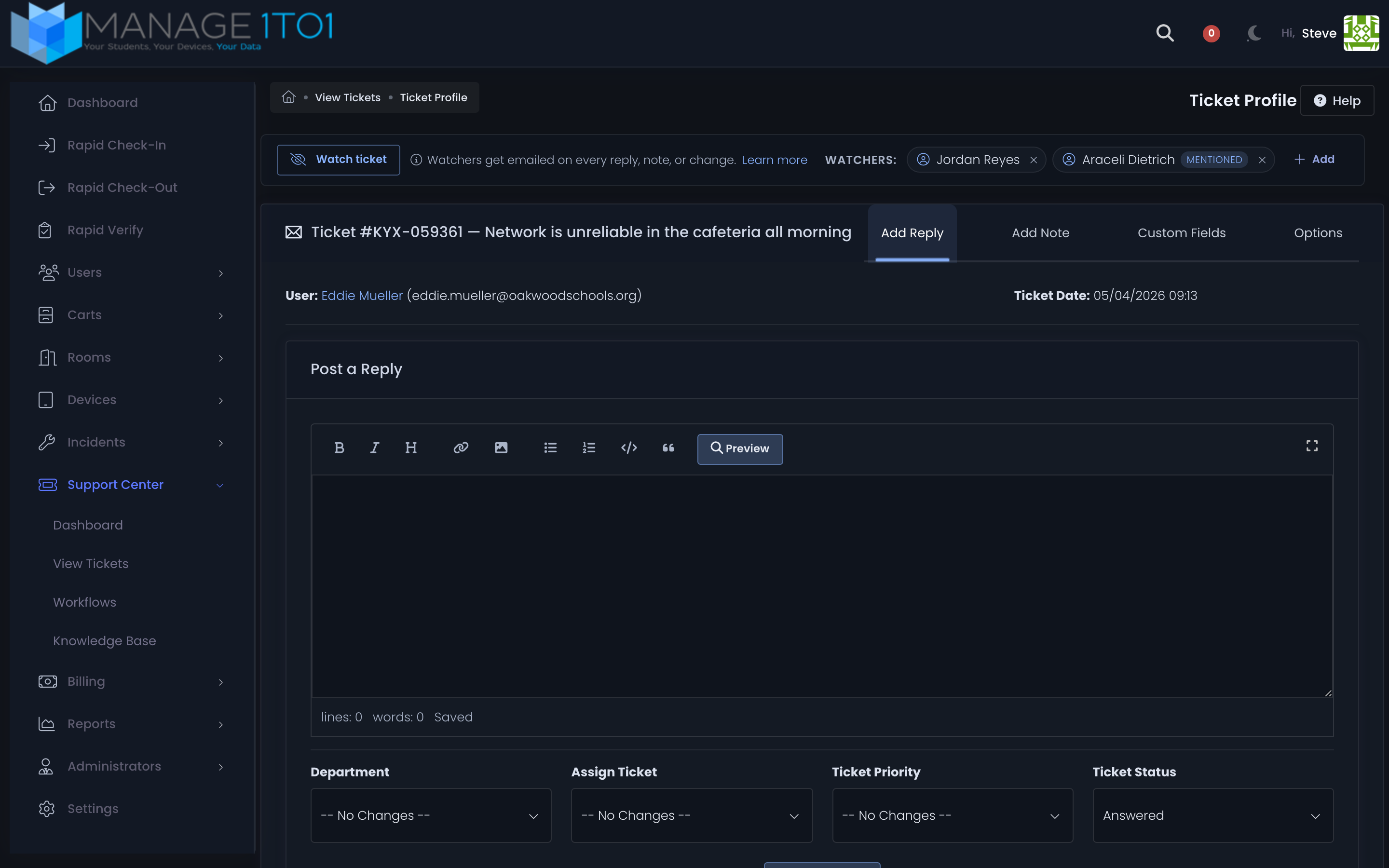
- Sidebar chip list of current watchers, click to remove
- @mentions in replies auto-add the mentioned admin as a watcher
- Department-aware ranking surfaces the most relevant teammates first when adding new watchers
- Watching a ticket gives view access even when role-level filters would otherwise hide it
Documentation: Ticket Watchers
Custom Field Alerts
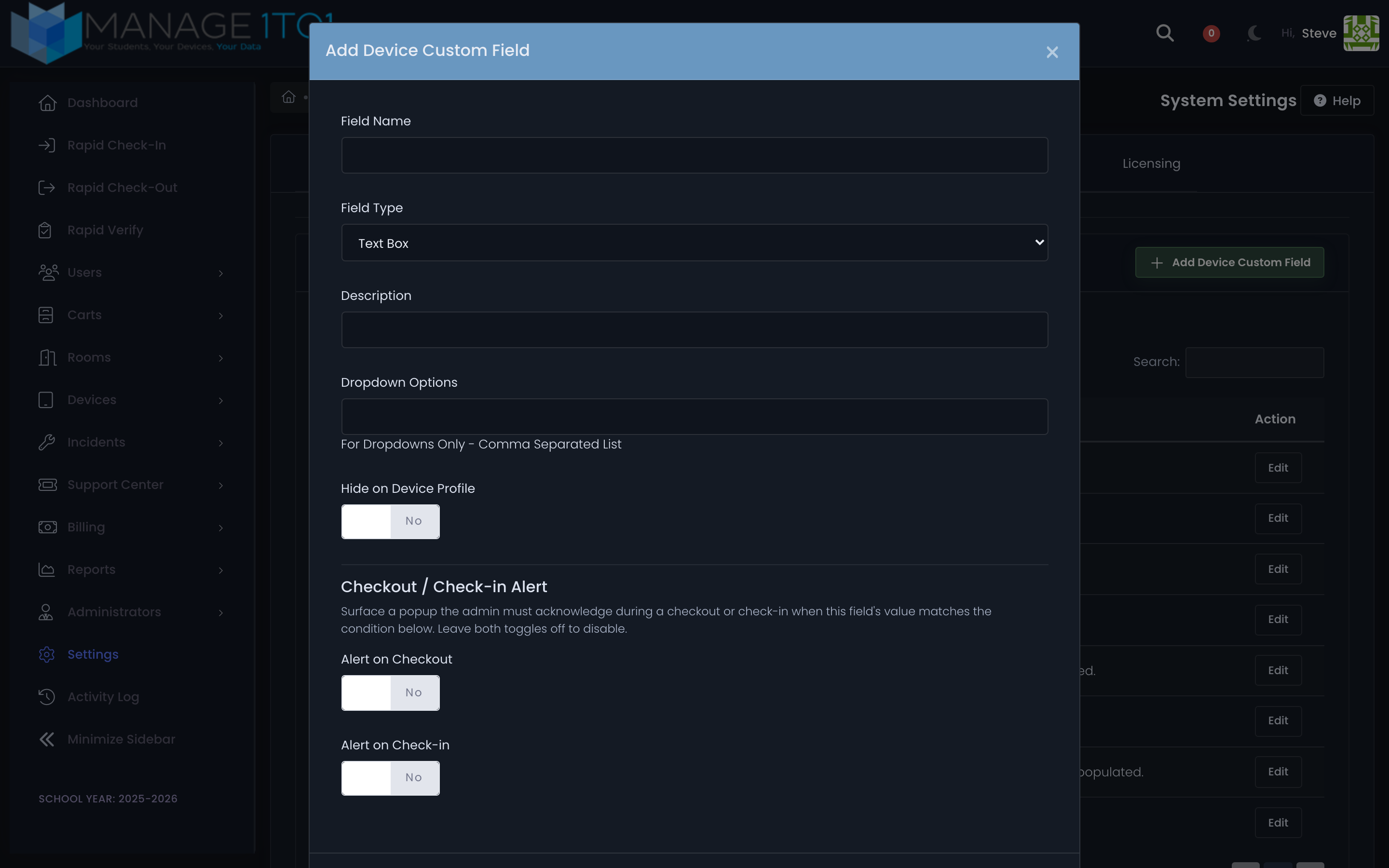
Any custom field can now be configured to fire an acknowledgement popup on every checkout flow when its value matches a trigger you set. Use it to highlight outstanding fees, open incidents, "do not lend" notes, sensitivity flags, or any other field that should stop the admin in their tracks.
Fires on:
- Rapid Check-Out
- Rapid Check-In
- Device Profile Check-Out
- Device Profile Check-In
Per-field configuration:
Alert on CheckouttoggleAlert on Check-intoggle- Trigger value (free-text match against the field's current value)
- Alert message body (HTML allowed)
Alerts must be acknowledged before the transaction continues, so the relevant context is in front of the admin handling the device every time.
Documentation: Custom Fields
Inventory Audit + Rapid Verify
The new Rapid Verify page records that you physically laid eyes on a device — without checking it in, checking it out, or changing anything else. It's purpose-built for end-of-year inventory sweeps, mid-year spot checks, and any "did we actually touch this thing?" workflow.
- Each scan stamps the device's Last Seen row with an
auditcontext badge - A scan tally on the page shows how many devices you've verified this session
- The Last Seen report gains a configurable Stale filter (3, 6, 12, 18+ months, custom threshold) so you can immediately surface devices nobody has scanned in N months
- A new Verify Inventory permission lets you grant access widely (everyone helps with the audit) or narrowly (only the inventory specialist)
- The Lost-device banner is informational here, not blocking — if it's in your hand, the audit records
Documentation: Inventory Audit · Device Last Seen
Mobile Barcode Scanner
Rapid Check-In, Rapid Check-Out, and Rapid Verify now show a Scan Asset Tag button on touch devices with a rear camera. Tap to open the camera, aim at a barcode or QR code, and on a successful read the value drops into the input and the form auto-submits.
- Supports standard 1D barcodes (Code 128, Code 39, EAN, UPC) and 2D codes (QR, Datamatrix)
- Multi-camera devices: tap the live preview to cycle to the next camera
- Vibration feedback on a successful decode (where supported)
- Mobile-only by design — the button never shows on a desktop with a USB scanner, where the camera workflow would just be in the way. The detection looks for touch input, a coarse pointer, and an accessible camera together.
Documentation: Rapid Checkout — Mobile Barcode Scanner
Automation Status Dashboard
A new dashboard under Automation Settings surfaces daily summaries of every scheduled cron run, so you finally have visibility into what your overnight automations are doing without grepping logs.
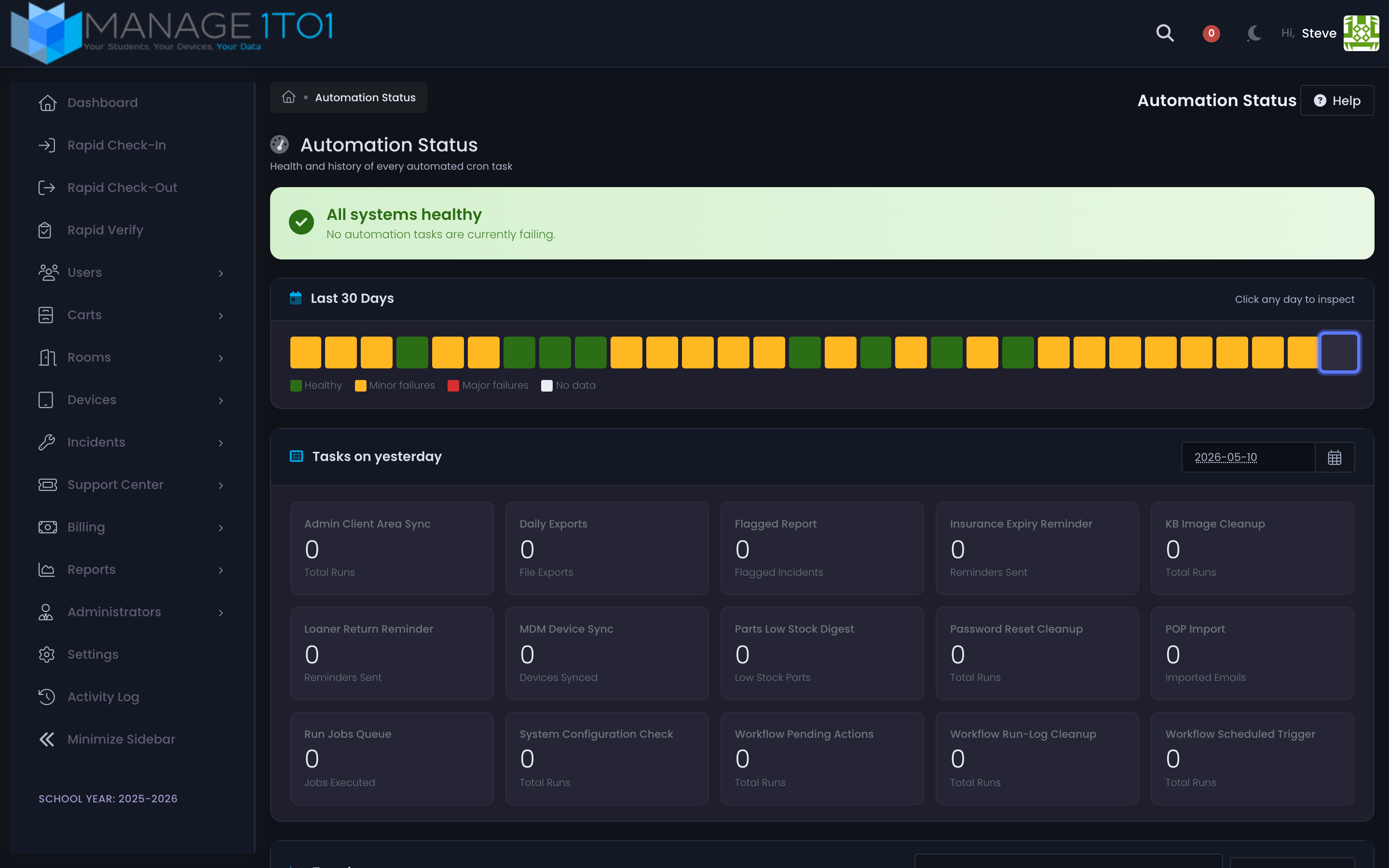
What it tracks:
- Student / staff / guardian imports
- Missing-user cleanup
- Automation invoice runs
- Reminder digests (pre-due, overdue, loaner return, insurance expiry)
- MDM device sync (per connector)
- Workflow scheduled triggers and pending-action drain
- Run-log cleanup, password-reset cleanup, system configuration check, parts low-stock digest, KB image cleanup
At a glance:
- A 30-day heatmap (green / yellow / red) showing health day by day
- Cards for "Tasks on yesterday" with run counts and outcome breakdowns
- Date-picker for historical lookback to any past day
- Drill-down modal opens per task showing the run's records and any per-record errors
Documentation: Automation Status
Insurance Expiry Reminders
Opt in on the Inventory settings tab and Manage1to1 automatically emails both the device's user and any guardian on file ahead of the insurance end date. Stop relying on a spreadsheet to know whose coverage is about to lapse.
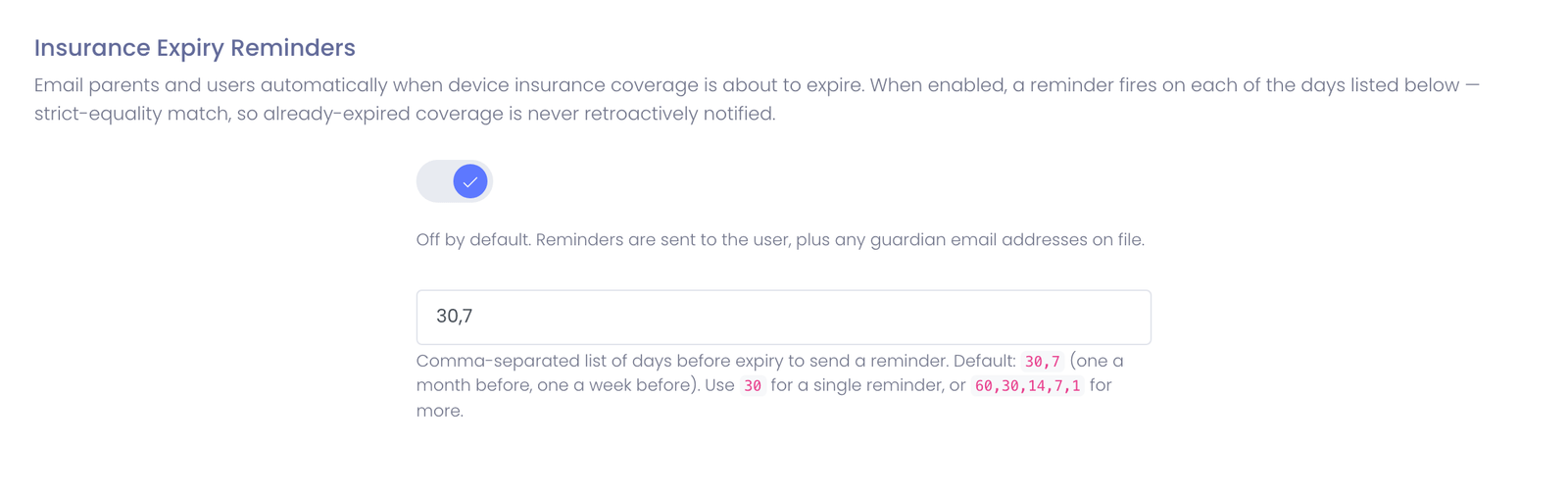
- Configurable cadence as a comma-separated list of days before expiry (e.g.
30,7or60,30,14,7,1) - Default is
30,7(one month plus one week) - User + guardian recipients automatically
- Customizable email template (
Insurance Expiry Reminder) — edit the language to match your district's voice - Soft-launch safe — strict-equality matching plus a per-row sent-log mean already-expired coverage never blasts retroactive emails when you first turn the feature on
Documentation: Insurance Expiry Reminders
Restricted Incident Statuses
Each incident status can now be locked to one or more administrator roles. Useful for keeping statuses like "Awaiting Parts," "Vendor Repair," or "Insurance Claim" reserved to the team that actually handles them, while everyone else still sees the standard set.
- Roles not on a status's allow-list don't see it in the status picker, can't transition tickets into it, and can't use it as a filter on the queue
- SuperAdmins bypass the restriction entirely (they already bypass everything in code) so emergency overrides remain frictionless
- Edit per-status in the Incidents settings tab — leave the allow-list empty to keep the status open to all roles
Documentation: Incident Status — Restricting to Specific Roles
Webcam Photo Capture Revamp
The incident photo upload flow has been rebuilt:
- Proper capture-and-confirm step — preview the photo before committing instead of attaching the first frame
- Fixes the preview aspect ratio (no more squashed faces)
- Releases the webcam stream cleanly when the modal closes
- Per-photo delete now syncs the badge count without a page reload
Loaner-Only Admin Scope
Student worker and front desk administrator roles can now be restricted to loaner devices only. They keep their permission to return / check out / verify, but their view of the fleet is limited to loaners — handy for districts with a service desk staffed by students who shouldn't see the full inventory.
Smarter Release Notifications
The in-product "What's new" modal has been rebuilt from the ground up.
- Only fires on minor / major version bumps. Patch releases and pre-release-revision bumps inside the same minor (
3.6.0 → 3.6.1,3.6.0-release.1 → 3.6.0-release.2) deliberately stay quiet so admins don't see the modal pop on every routine deploy. - Per-feature entries support inline demo clips and screenshots
- "Learn more in the docs" link on every entry deep-links to the matching docs page
- "Read full release notes" button on each version section opens this page
- Properly themed for dark mode (the old modal was nearly unreadable against a dark background)
Improvements
-
Case-Insensitive Device Lookups — Searching for a serial or asset tag no longer cares about case, across Rapid Check-Out, Rapid Check-In, bulk device import, bulk checkout, bulk check-in, bulk status change, add-device validation, Mojo integration, and the ASM replacement queue.
-
Smarter Guardian Deduplication — The student and guardian importers use a tighter fuzzy-matching algorithm that catches more duplicate guardians without false positives.
-
Tighter MDM Sync Filters — JAMF Pro, JAMF School, and other MDM connectors now sync active devices only, and AppleCare+ subscription records no longer block access to a device profile when present.
-
Self-Hosted Login Captcha — The login page now uses Altcha (self-hosted) instead of Google reCAPTCHA. No third-party call-out on the login form, and captcha failures are logged for audit.
-
Cron Student / Staff Processing Optimization — The student and staff sync crons are noticeably more efficient on larger datasets.
-
Quieter Activity Log — No-op
user modifiedlog entries are no longer recorded for kindergarten-mapped grade changes that don't actually change anything. -
Mark Found Inline on Rapid Verify — The Lost-device banner on Rapid Verify now has an inline Mark Found button (green on yellow, fully readable in both themes) so you can clear the lost flag mid-audit without leaving the page.
-
Auto-Stamp Last Seen on Device Add — Adding a device to inventory automatically stamps its Last Seen row with a
deploymentcontext, so brand-new devices don't immediately surface on the Stale filter as never-seen. -
Round-Robin Workflow Action with Per-Admin Opt-Out — The Workflows round-robin action lets each admin in the pool opt themselves out (vacation, OOO) without removing them from the group permanently.
Bug Fixes
-
JAMF Sync — Active Only — JAMF and other MDM syncs no longer pull inactive / archived devices that previously polluted the inventory.
-
AppleCare+ Subscriptions — AppleCare+ subscription objects no longer prevent the affected device profile from loading.
-
Replaced-by-AppleCare Devices — Devices replaced through AppleCare no longer mistakenly show as active in inventory after replacement.
-
Add / Edit Room — Resolved an HTTP
Method Not Allowederror when saving a new or edited room. -
Incident Photo Upload + Delete — Fixed an issue where the incident photo upload could fail under certain conditions, and the per-photo delete now syncs the badge count without a page reload.
-
ASM Resync — Adjusted ASM filter definitions and provided a bulk-remove-insurance flow to fix sync errors on older replacement-queue records.
-
KB Category Save — Saving a Knowledge Base category no longer 404s afterwards.
-
Imports — Null Guards — Tightened student and staff import logic to guard against null records that could fail mid-batch.
-
Return to Last Tab on Utilities — The Utilities page now remembers the last selected tab on revisit instead of always defaulting back to the first.
Changelog
| Type | Issue | Description |
|---|---|---|
| NEW FEATURE | MAN-945 | Help Desk Routing Workflows engine |
| NEW FEATURE | MAN-724 | Ticket watchers |
| NEW FEATURE | MAN-686 | Custom field alerts on Rapid + Device Profile checkout flows |
| NEW FEATURE | MAN-935 | Device Last Seen tracking |
| NEW FEATURE | MAN-936 | Rapid Verify / Inventory Audit |
| NEW FEATURE | MAN-1028 | Mobile barcode scanner |
| NEW FEATURE | MAN-1015 | Automation Status admin dashboard |
| NEW FEATURE | MAN-938 | Insurance Expiry Reminders |
| NEW FEATURE | MAN-941 | Restricted Incident Statuses |
| NEW FEATURE | MAN-1027 | Webcam photo capture revamp |
| NEW FEATURE | MAN-926 | Loaner-only admin scope |
| NEW FEATURE | MAN-1039 | Version-aware release-notes modal |
| IMPROVEMENT | MAN-1005 | Case-insensitive serial / asset-tag lookup |
| IMPROVEMENT | MAN-1010 | Guardian deduplication |
| IMPROVEMENT | MAN-1014 | Migrate from reCAPTCHA to Altcha |
| IMPROVEMENT | MAN-1029 | Self-host Altcha + captcha failure logging |
| IMPROVEMENT | MAN-1009 | Optimize student/staff processing cron |
| IMPROVEMENT | MAN-1049 | Mark Found inline button + contrast |
| IMPROVEMENT | MAN-1050 | Auto-stamp Last Seen on device add |
| IMPROVEMENT | MAN-791 | Suppress no-op user-modified logs |
| BUG | MAN-1008 | JAMF / MDM sync — active devices only |
| BUG | MAN-1011 | AppleCare+ subscriptions no longer block device profile |
| BUG | MAN-1026 | Replaced-by-AppleCare devices showing as active |
| BUG | MAN-1016 | Add / edit room HTTP Method Not Allowed |
| BUG | MAN-1031 | Incident photo upload + dynamic delete |
| BUG | MAN-1034 | ASM filter redefinition + bulk insurance remove |
| BUG | MAN-1035 | 404 after saving a KB category |
| BUG | MAN-1007 | Imports null-guard |
| BUG | MAN-1030 | Return to last tab on Utilities |