Check-In/Check-Out Auto-Placement
Check-In/Check-Out Auto-Placement puts a student on Check-In/Check-Out on its own when their outstanding balance reaches an amount you choose, and takes them back off once the balance clears. It turns "students who owe us money have to check their device in daily" into a rule you set once instead of a list you maintain by hand.
The feature is off by default. Nothing is placed or lifted until you turn it on and set a threshold.
This page acts on restricted students, so it needs the View/Edit User Restricted permission.
Turning it on
Go to Settings → Check-In/Check-Out Auto-Placement.
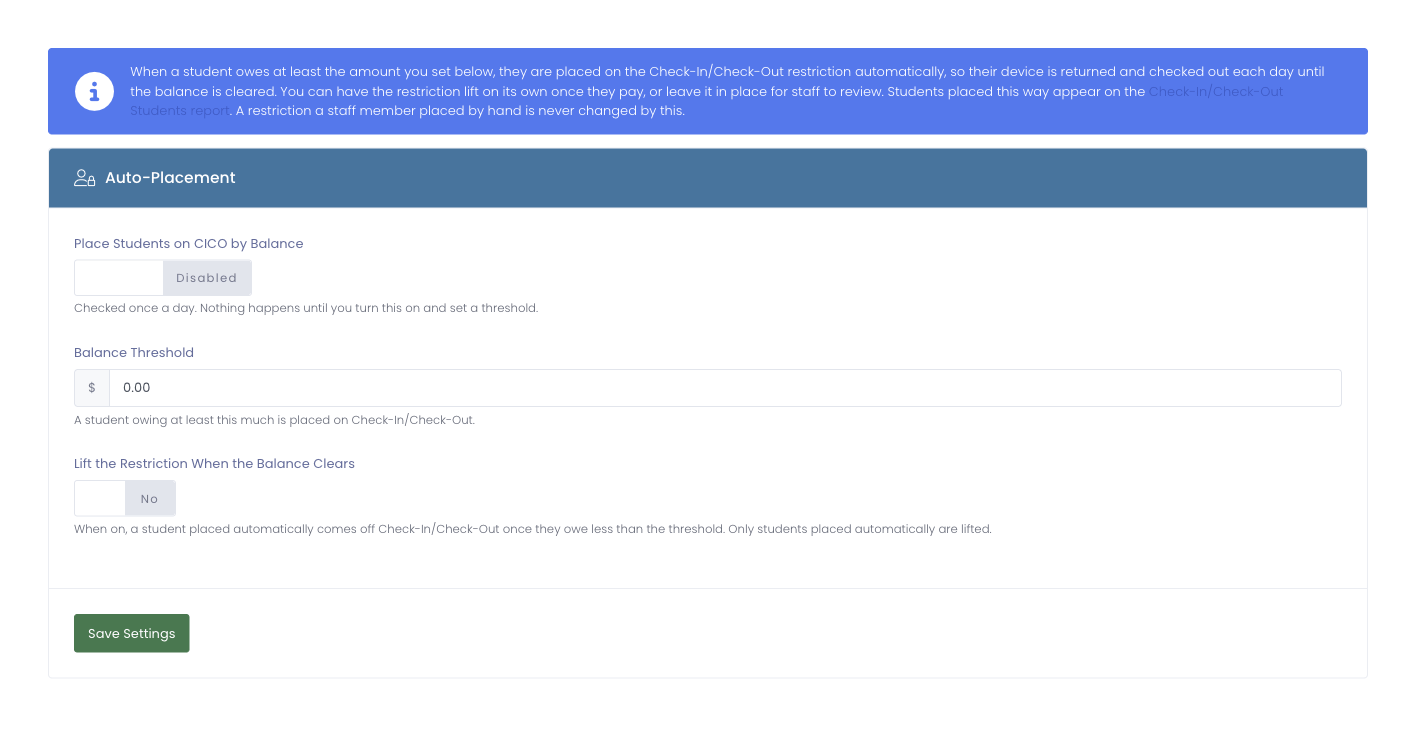
The page has three settings:
- Place Students on CICO by Balance: the master switch. While it is off, nothing is placed or lifted automatically.
- Balance Threshold: a student who owes at least this much is placed on Check-In/Check-Out.
- Lift the Restriction When the Balance Clears: when on, a student who was placed automatically comes back off Check-In/Check-Out once they owe less than the threshold. Turn it off if you would rather review each student before lifting the plan by hand.
Balances are checked once a day.
Auto-placement only ever lifts students it placed automatically. A student you put on Check-In/Check-Out yourself (or on any other restriction) is never changed by this setting, no matter what their balance is.
How it works day to day
Once a day, each active student's outstanding balance is compared to your threshold:
- A student who owes at least the threshold and is not already restricted is placed on Check-In/Check-Out. On the Check-In/Check-Out Students report, these students show Automatic (outstanding balance) as who requested the plan.
- A student who was placed automatically and now owes less than the threshold is taken back off, but only when Lift the Restriction When the Balance Clears is on.
Students are never auto-placed on top of a restriction they already have, so turning this on will not override plans you manage yourself.