Check-In/Check-Out Notifications
Check-In/Check-Out Notifications send a daily email to the staff you choose, listing any Check-In/Check-Out students whose device is still out after a cutoff time you set. It is the hands-off companion to the Check-In/Check-Out Students report: instead of remembering to check the report each afternoon, the people who need to know get the list in their inbox.
The feature is off by default. No email is sent until you turn it on and choose who receives it.
This page lists restricted students, so it needs the View/Edit User Restricted permission.
Turning it on
Go to Settings → Check-In/Check-Out Notifications.
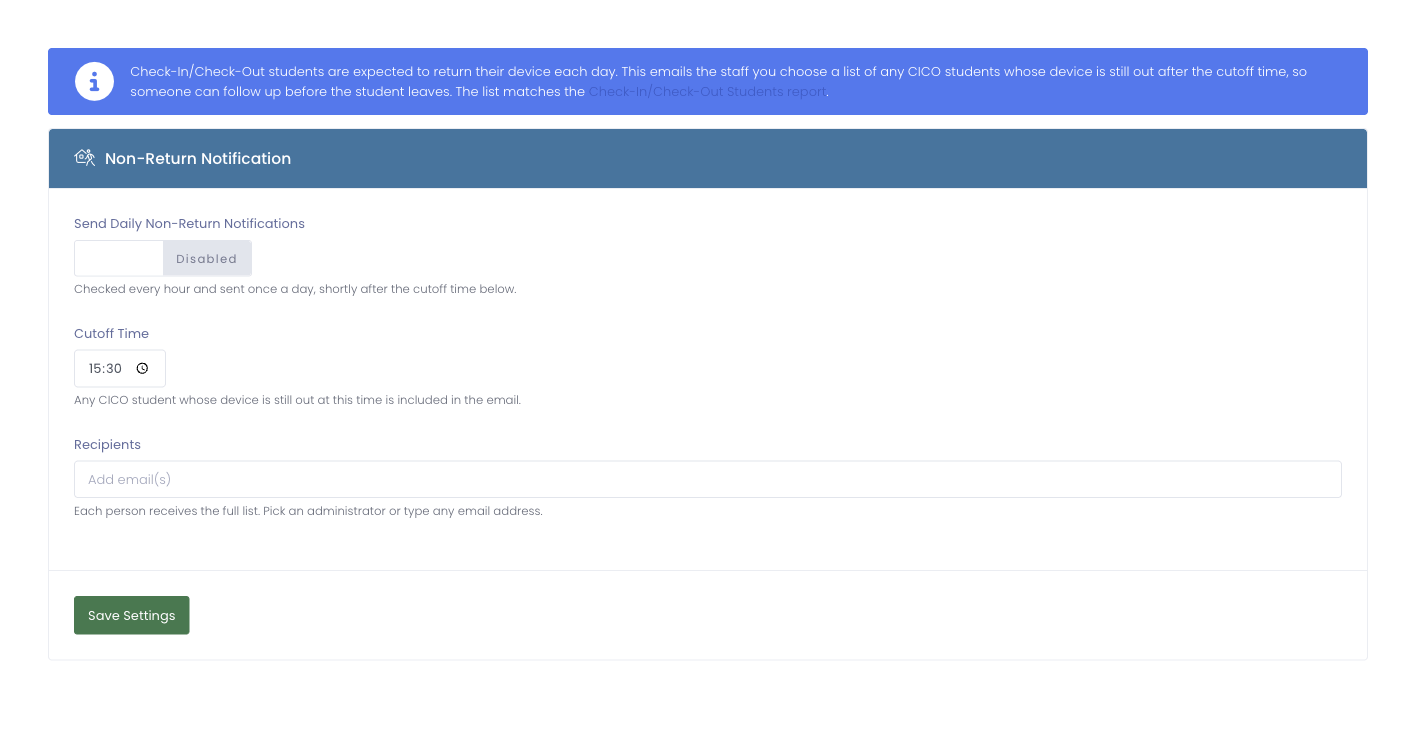
The page has three settings:
- Send Daily Non-Return Notifications: the master switch. While it is off, nothing is sent.
- Cutoff Time: the end-of-day time that decides who is "still out." Any Check-In/Check-Out student whose device has not been returned by this time is included in that day's email.
- Recipients: the people who receive the list. Pick an administrator from the list or type any email address. Everyone chosen receives the full list.
The notification is checked every hour and sent once a day, shortly after the cutoff time.
Pick the staff who actually collect or follow up on devices: a media center lead, a dean, or a building administrator. Each recipient gets the same list, so there is no need to split it up here.
What the email looks like
Each day, if any Check-In/Check-Out students still have a device out at the cutoff, recipients get one email listing those students, their device, and when it was checked out, with a link straight to the Check-In/Check-Out Students report. If everyone has returned their device, no email is sent that day.