My Checkouts (User Portal)
The My Checkouts page in the User Portal answers the two questions staff and students ask the help desk most often:
- "What do I have checked out right now?"
- "Did I ever have that device a few months ago?"
Both are now self-serve. Anyone signed in to the User Portal can pull up their own checkouts without filing a ticket or asking a tech to look it up.
How to get there
Sign in to the User Portal. My Checkouts appears in the User Portal nav bar alongside Help Center, My Tickets, and Submit Ticket.
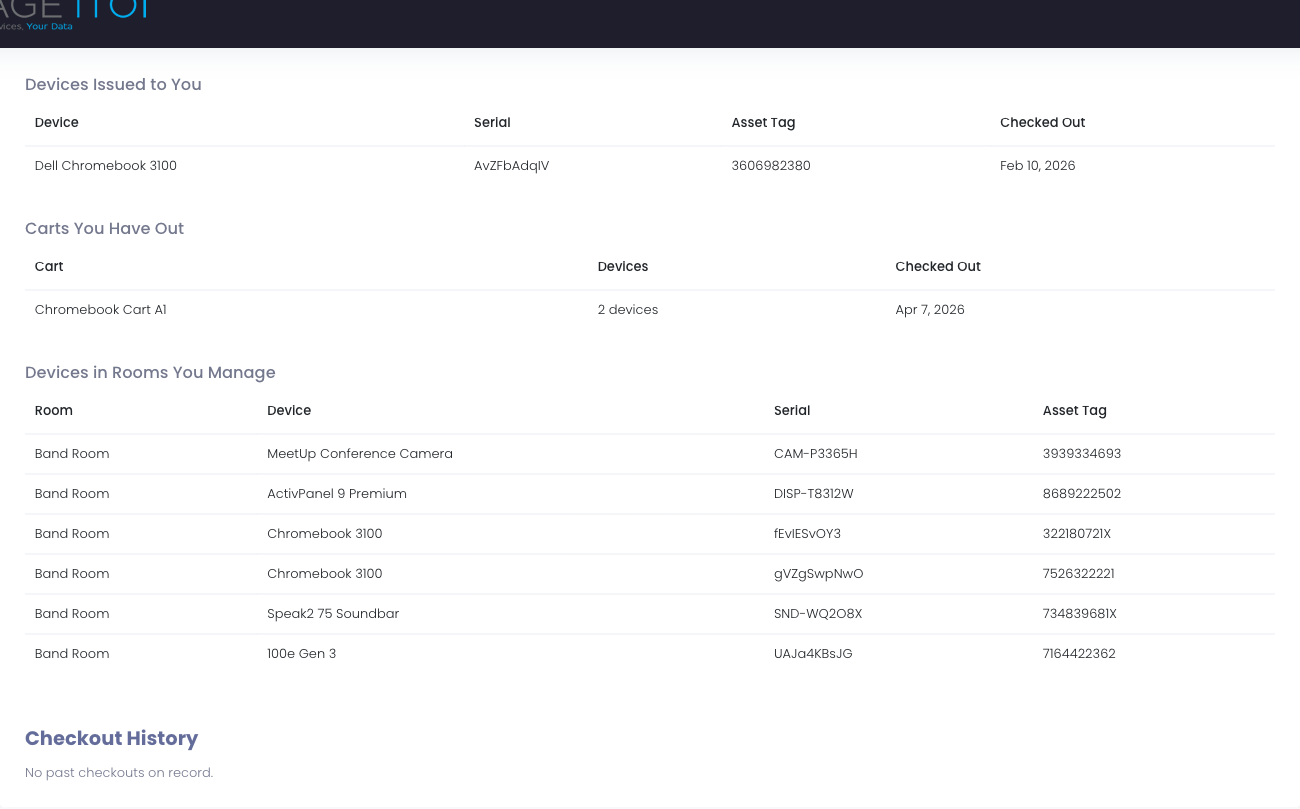
What's on the page
Current Checkouts
Everything the signed-in user has active right now, broken into clearly labeled sections so the user can find the row that matches their situation:
Devices Issued to You
- Devices checked out to the user personally — a staff laptop, a student's daily Chromebook, etc.
- One row per device with the device type, serial number, asset tag, and checkout date.
Carts You Have Out
- Carts checked out to the user (typical for teachers with classroom carts).
- One row per cart with the cart name, total device count, and checkout date.
Devices in Rooms You Manage
- Devices that physically live in a room the user is the teacher-of-record for — classroom projectors, interactive displays, conference-room cameras, anything mounted in the space.
- One row per device with the room name, device type, serial, and asset tag.
- This section is hidden entirely for users with no current room responsibilities, so it doesn't clutter the page for students or floating staff.
Accessories Issued to You
- Chargers, styluses, hard cases, headphones, and other accessories the user has been issued from the Accessories module.
- One row per accessory with its name, status (Active or Lost), and the date it was issued.
- A Lost badge means a tech has marked that accessory as lost on the user's profile — the user can use this as a self-serve reminder when reporting it to the help desk.
- The section is hidden entirely when the user has no active or lost accessories.
Empty sections collapse so the user only sees categories they actually have something in.
Checkout History
Past closed checkouts from the last 24 months, most recent first. One row per past lease with:
- Device type
- Serial number and asset tag
- Date the device was checked out
- Date it was returned
This is bounded to two years so the page stays responsive for long-tenured staff with hundreds of past checkouts. If the user has no past checkouts in that window, the section shows a brief "No past checkouts on record" line and the user moves on.
What's not on the page
By design, My Checkouts is just about devices the user has or had. It does not show:
- Tickets — that's what My Tickets is for.
- Incidents — incident records are an internal IT workflow and stay in the admin area. Users see incident outcomes through the ticket that opened them.
- Invoices or fines — billing has its own surface.
- Other users' data — the page is strictly self-scoped. There is no way to pull up someone else's checkouts from the User Portal.
Tips for Users
- Bookmark it. If the help desk asks "do you still have device X?" you can pull up the page in two clicks and answer authoritatively.
- Use it before submitting a ticket. "I think I lost a Chromebook last spring" is easier to answer when you can read off the serial.
- Empty page = no records, not a bug. If you're new or you've returned everything cleanly, the page shows a friendly empty state. That's expected.