Invoice Profile
The Invoice Profile is the central workspace for managing a single invoice. Think of it as the complete invoice file - showing all details, payment history, email communications, and related incident information in one place.
You access invoice profiles by clicking on an invoice from View Invoices or from a user's Billing History tab.
To view an invoice profile, you need the View Invoices permission assigned to your role. Additional actions (recording payments, editing, emailing) require specific permissions (e.g., Record Payments, Edit Invoices).
Understanding Invoice Profiles
Think of an invoice profile as the complete billing record for one charge - everything about this specific bill from creation to final payment.
What the invoice profile shows:
- Invoice details (amount, line items, billing contact)
- Payment status and remaining balance
- Payment history (all transactions applied)
- Email history (when invoices were sent)
- Associated incident (if damage/loss related)
- Invoice PDF for printing or emailing
What you can do from the invoice profile:
- View complete invoice details
- Record payments
- Email invoice to parent/guardian
- Print or download invoice PDF
- Link to related incident
- Edit invoice (with permission)
- Delete payment transactions (with permission)
Why invoice profiles are important:
- Payment management - Central place to record and track payments
- Parent communication - Email invoices and track delivery
- Audit trail - Complete history of all invoice activity
- Dispute resolution - Show payment history when questions arise
- Reconciliation - Verify payments and balances for accounting
Invoice Profile Tab Structure
The invoice profile is organized into tabs, each serving a specific purpose:
Tab Overview
Invoice Details (Default tab)
- View complete invoice information
- Print or download PDF
- See invoice number, date, amounts
- Review line items and comments
Apply a Payment
- Record payments against invoice
- Track payment method and details
- View transaction history
Email Invoice
- Send invoice to parent/guardian
- View email history
- Resend if needed
Assign to Incident (If enabled)
- Link invoice to damage/loss incident
- Cross-reference for incident billing
Invoice Status and Balance
The invoice profile displays current payment status:
Invoice Statuses
Unpaid
- No payments applied
- Full balance outstanding
- Remaining Balance = Invoice Amount
Partial
- Some payment(s) received
- Balance still owed
- Remaining Balance < Invoice Amount
Paid
- Fully paid
- No balance remaining
- Remaining Balance = $0.00
Invoice Amount vs. Remaining Balance
Invoice Amount:
- Original total when invoice was created
- Never changes (even with payments)
- Shows what was billed
Remaining Balance:
- Amount still owed
- Decreases as payments are applied
- What parent currently owes
Example:
- Invoice Amount: $450.00
- Payments applied: $200.00
- Remaining Balance: $250.00
Invoice Details Tab
The default tab showing complete invoice information:
What You'll See
Header information:
- Invoice number (e.g., INV-2024-001234)
- Invoice date
- Invoice status (Unpaid, Partial, Paid)
- Assigned user (student/staff)
Billing information:
- Billed To name
- Mailing address (if provided)
Line items:
| Item | Description | Quantity | Price | Total |
|---|---|---|---|---|
| Screen Repair | Chromebook screen replacement | 1 | $125.00 | $125.00 |
Totals:
- Subtotal (sum of line items)
- Payments applied (total of all payments)
- Remaining balance (what's still owed)
Comments:
- Internal notes about the invoice
- Incident references
- Special circumstances
Associated information:
- Linked incident (if applicable)
- Related user profile link
Actions Available
Print Invoice
- Generate printable invoice PDF
- Use for mailing physical invoices
- Provide to parents upon request
Download PDF
- Save invoice as PDF file
- Email manually or archive
Portal Payment Link (If enabled)
- URL for online payment
- Share with parents for electronic payment
- Requires online payment portal integration
Edit Invoice (With permission)
- Modify invoice details
- May be restricted if payments applied
Delete Invoice (With permission)
- Remove invoice entirely
- Only if no payments recorded
Apply a Payment Tab
Record payments received against the invoice:
How to Record a Payment
- Click Apply a Payment tab
- Enter payment details:
- Amount Paid - How much was received
- Transaction/Payment ID - Check number, receipt number, or transaction ID
- Payment Method - Cash, check, credit card, money order, etc.
- Payment Date - When payment was received (default: today)
- Notes - Optional context about payment
- Click Save or Record Payment
- Payment is applied
- Remaining balance updates
- Transaction appears in Transaction Summary
Payment Fields Explained
Amount Paid (Required)
- Dollar amount received
- Can be partial payment (less than remaining balance)
- Can be full payment (equal to or greater than balance)
- Example: $100.00
Transaction or Payment ID (Optional but recommended)
- External reference for this payment
- Check number: "Check #1234"
- Receipt number: "Receipt #5678"
- Card transaction: "Trans #ABC123"
- Helps reconcile with external systems
Payment Method (Required)
- How payment was made
- Common options:
- Cash
- Check
- Credit/debit card
- Money order
- Electronic payment
- Waiver/forgiveness
- Other
Payment Date (Optional)
- When payment was received
- Defaults to today
- Can backdate if payment was received earlier but entered late
Notes (Optional)
- Additional context
- Example: "Partial payment, parent will pay remainder next month"
- Example: "Payment plan installment 1 of 5"
After Recording Payment
What happens:
- Remaining balance decreases by payment amount
- Invoice status updates (Unpaid → Partial or Partial → Paid)
- Payment appears in Transaction Summary
- Payment is logged on user's Billing History
Example:
Before payment:
Invoice Amount: $450.00
Remaining Balance: $450.00
Status: Unpaid

Record $200 payment:
Amount Paid: $200.00
Payment Method: Check
Transaction ID: Check #1234

After payment:
Invoice Amount: $450.00 (unchanged)
Remaining Balance: $250.00 (decreased)
Status: Partial (updated)
Transaction Summary
The Transaction Summary section (visible on all tabs) shows all payments applied:
| Date | Amount | Method | Transaction ID | Entered By | Actions |
|---|---|---|---|---|---|
| 11/15/2024 | $200.00 | Check | Check #1234 | Admin Jones | [Delete] |
What it shows:
- When payment was recorded
- How much was paid
- Payment method
- Reference number
- Who recorded it
- Delete button (with permission)
Purpose:
- Audit trail of all payments
- Verify payments for reconciliation
- Research payment history for disputes
- Delete erroneous payments (with permission)
Email Invoice Tab
Send invoice to parent/guardian via email:
How to Email an Invoice
- Click Email Invoice tab
- Review/edit recipient information:
- To: Parent/guardian email address
- Subject: Email subject line
- Message: Email body text (template-based)
- Preview email (if available)
- Click Send Invoice
- Invoice PDF is attached to email
- Email delivery is logged
- Email appears in Email History
Email Information
To (Recipient):
- Auto-populated from user's guardian email
- Can typically be edited for this send
- Example: parent@email.com
Subject:
- Email subject line
- May be template-based
- Example: "Invoice #INV-2024-001234 from Lincoln Elementary"
Message:
- Email body text
- Usually uses district-configured template
- May include payment instructions
- May include portal payment link
Invoice Attachment:
- PDF of invoice automatically attached
- Shows all invoice details
- Printable for parent's records
Email History
The Email History section shows all times this invoice was emailed:
| Date | Sent To | Sent By | Status |
|---|---|---|---|
| 11/15/2024 2:30 PM | parent@email.com | Admin Jones | Delivered |
| 11/01/2024 10:15 AM | parent@email.com | Admin Smith | Delivered |
What it shows:
- When invoice was emailed
- Recipient email address
- Who sent it
- Delivery status (if tracked)
Purpose:
- Verify invoice was sent
- Track reminder emails
- Answer parent's "I never received it" questions
- Audit communication history
When Emails Fail
Common reasons:
- Invalid email address
- Inbox full
- Spam filters blocking
- Email service configuration issues
What to do:
- Verify guardian email in user profile
- Print and mail physical invoice
- Contact parent by phone
- Update email address if incorrect
Assign to Incident Tab (If Enabled)
Link the invoice to a specific damage or loss incident:
How to Link to Incident
- Click Assign to Incident tab
- Enter incident number in search field
- Or search by incident type/date
- Select matching incident
- Click Assign or Link
- Invoice is now linked to incident
- Incident shows invoice reference
- Invoice shows incident reference
Why Link Invoices to Incidents
Benefits:
- Cross-reference - Navigate between incident and invoice easily
- Context - See which damage led to which charge
- Tracking - Monitor incident resolution through billing
- Parent questions - Quickly show incident details when discussing charge
Example:
- Incident #2024-001890: Cracked screen, 10/15/2024
- Invoice #INV-2024-005678: $125 screen repair charge
- Linked together for complete record
Viewing Linked Incident
Once linked, the invoice profile shows:
- Incident number
- Incident type (Damage, Loss, etc.)
- Incident date
- Link to open incident profile
Device Information on Invoices
When an invoice is linked to an incident, the related device information automatically appears on:
- Printed invoices - Device serial number and asset tag display in the invoice header
- PDF downloads - Same device details included in the generated PDF
- Email templates - Merge fields available for device serial and asset tag
This helps parents and guardians identify exactly which device the charge relates to, especially useful when a student has had multiple devices throughout the year.
Common Use Cases
Scenario 1: Parent Pays Partial Amount
Parent brings $100 check for $250 invoice:
- Open invoice from View Invoices or user's Billing History
- Click Apply a Payment tab
- Enter payment:
- Amount Paid: $100.00
- Payment Method: Check
- Transaction ID: Check #2468
- Notes: "Partial payment, parent will pay remainder in 2 weeks"
- Click Record Payment
- Remaining balance updates: $250 - $100 = $150
- Status changes from "Unpaid" to "Partial"
- Parent receives receipt/confirmation
- Follow up in 2 weeks for remaining $150
Result: Partial payment recorded, tracked for completion.
Scenario 2: Emailing Invoice Reminder
Invoice unpaid for 30 days, send reminder:
- Open invoice profile
- Click Email Invoice tab
- Review recipient: parent@email.com
- Subject auto-fills: "Payment Reminder: Invoice #INV-2024-001234"
- Message includes payment instructions and amount owed
- Click Send Invoice
- Email delivered
- Email History shows both original (30 days ago) and reminder (today)
Result: Payment reminder sent and documented.
Scenario 3: Parent Questions Invoice Amount
Parent calls asking why invoice is for $165:
- Open invoice profile
- Review Invoice Details tab:
- Line 1: Screen Repair $125
- Line 2: Case Replacement $15
- Line 3: Charger Replacement $25
- Subtotal: $165
- Click linked Incident #2024-002100
- Review incident photos showing screen, case, and charger damage
- Explain to parent: "The invoice covers three items damaged in the water spill incident: screen repair for $125, replacement case for $15, and replacement charger for $25, totaling $165."
Result: Parent's question answered with clear itemization.
Scenario 4: Payment Plan Installments
Parent agreed to $75/month for 6 months on $450 invoice:
Month 1 (12/1/2024):
- Open invoice
- Apply Payment: $75, Check #3001, Notes: "Payment plan installment 1 of 6"
- Balance: $450 - $75 = $375
Month 2 (01/1/2025):
- Open invoice
- Apply Payment: $75, Check #3015, Notes: "Payment plan installment 2 of 6"
- Balance: $375 - $75 = $300
Continue monthly until balance $0
Result: Payment plan tracked through sequential payment records.
Scenario 5: Correcting Erroneous Payment
$200 payment recorded by mistake (should have been $100):
- Open invoice profile
- Review Transaction Summary
- Find erroneous $200 payment
- Click Delete next to that payment (requires Delete Payment permission)
- Confirm deletion
- Balance increases back by $200
- Record correct $100 payment
- Add note: "Corrected from $200 to $100 per parent's check"
Result: Incorrect payment removed, correct amount recorded.
Editing and Deleting Invoices
Editing Invoices
When you can edit:
- With Edit Invoices permission
- Before payments applied (in most systems)
- Some systems allow editing after payments with restrictions
What you can edit:
- Billed To information
- Line items (add, remove, adjust amounts)
- Invoice date
- Comments/notes
What you typically can't edit after payments:
- Line item amounts (financial integrity)
- Invoice amount (locked once paid)
How to edit:
- From invoice profile, click Edit button
- Make changes
- Save
- Changes are logged in activity/audit trail
Deleting Invoices
When you can delete:
- Invoice created by mistake
- No payments recorded
- With Delete Invoices permission
When you CANNOT delete:
- Invoice has payments applied
- Invoice has been emailed to families
- Historical records that must be preserved
What to do instead of deleting:
- Cancel the invoice by changing its status to Cancelled — this preserves the financial record, marks it no longer actionable, and keeps the audit trail. Use this when the charge shouldn't have existed.
- Waive the invoice — see below — when the charge was valid but you're forgiving what's owed (e.g. financial hardship).
Waiving an Invoice
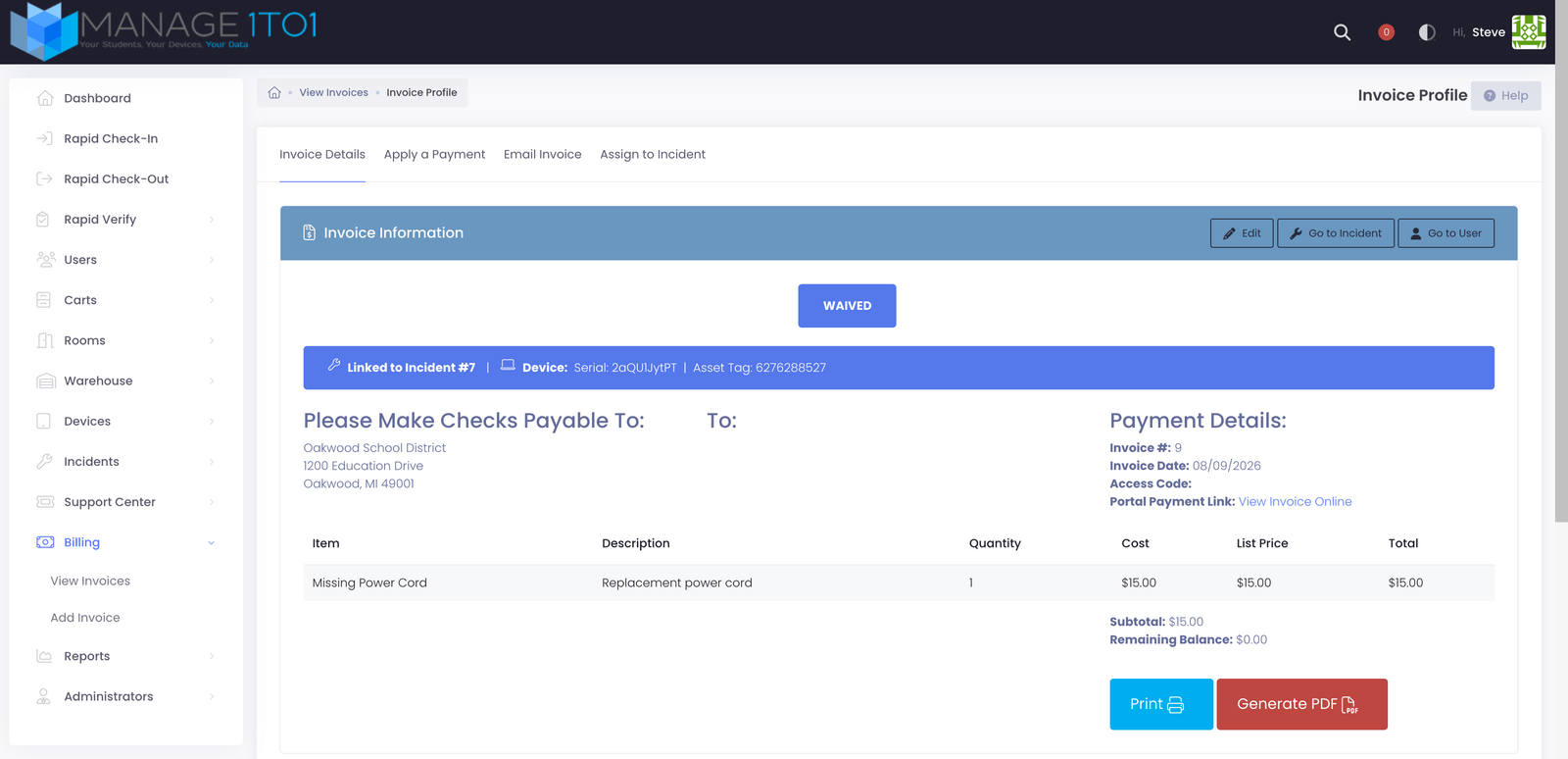
Sometimes a charge is legitimate but you decide to forgive it — a family in financial hardship, a fee covered by the school, or a one-off exception. Waiving an invoice zeroes the balance and marks it Waived, with a reason kept on the record. It's distinct from a cash payment (no money was collected) and from cancelling (the charge was real, you're just not collecting it).
Waiving is controlled by the Waive Invoice permission. It's separate from recording a payment because it writes off money owed. Grant it to a role under Administrators → Manage Roles.
How to waive an invoice:
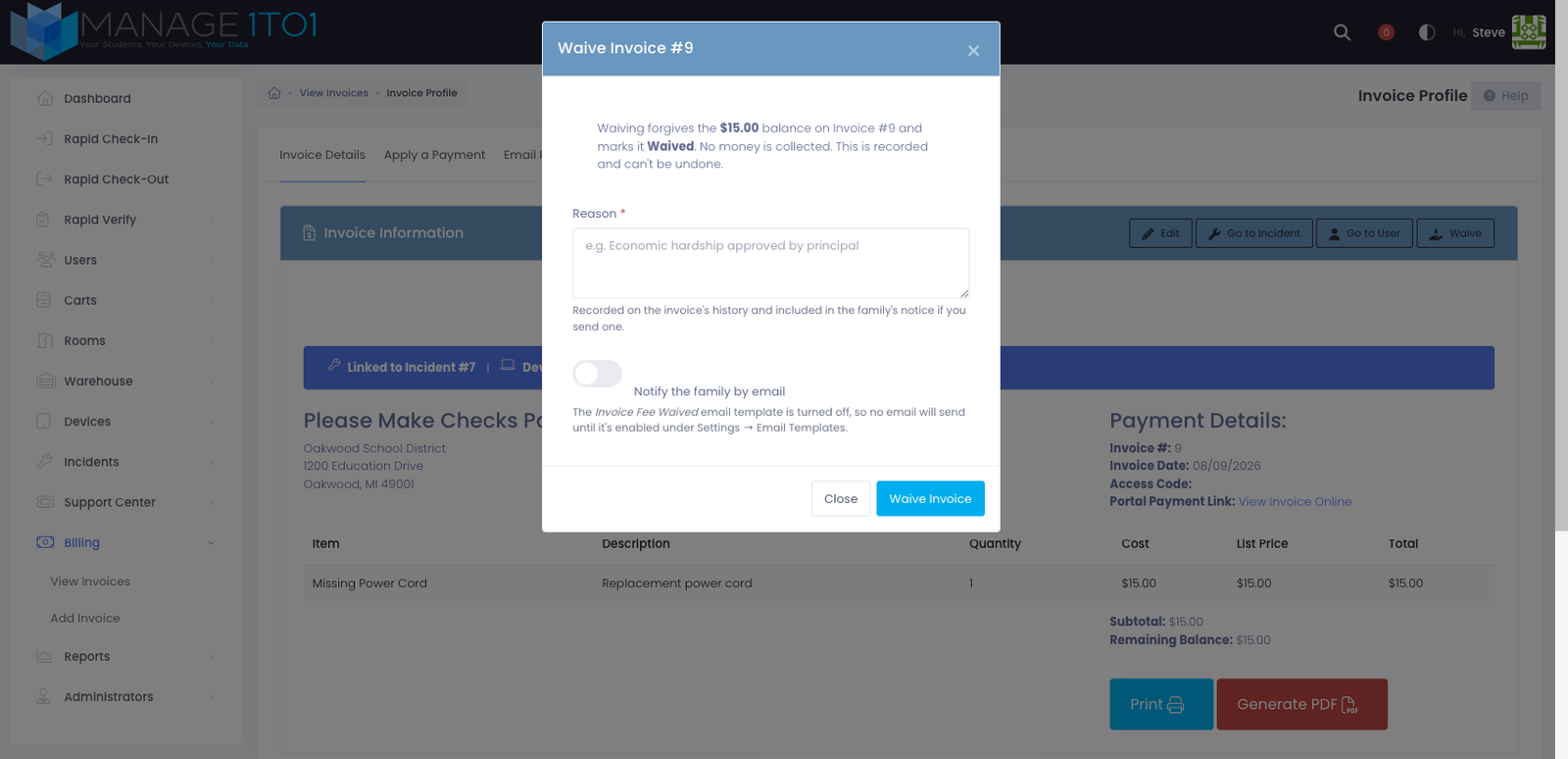
- Open the invoice from Billing → View Invoices.
- Click the Waive button in the invoice header. (It only appears on invoices that still have a balance owed.)
- Enter a reason — this is kept on the invoice's history and included in the family's notice if you choose to send one.
- Optionally turn on Notify the family by email to send the Fee Waived notice.
- Click Waive Invoice.
The invoice immediately reads Waived with a zero balance, and the waiver — who did it, when, and why — is recorded in the activity log.
The Fee Waived email template starts turned off, so no notice goes out until you enable it under Settings → Email Templates. Until then, the Notify the family option has no effect and the dialog says so. Once enabled, you can customize its wording — including the {$invoice_waived_reason} placeholder that fills in the reason you entered.
A waived invoice counts as settled: any device fee or insurance the invoice covered is applied just as it would be on a normal payment. Waiving can't be undone.
Tips for Using Invoice Profiles
✅ Do:
- Record payments promptly when received
- Include transaction IDs (check numbers, receipt numbers)
- Add notes to payments for context
- Email invoices soon after creation
- Verify guardian email before sending
- Link invoices to incidents for complete documentation
- Use Transaction Summary to verify payments
- Print/download PDFs for parent requests
❌ Don't:
- Delete payments to hide mistakes (correct them properly)
- Skip transaction IDs (makes reconciliation difficult)
- Forget to send invoice after creation
- Assume emails were received (check email history)
- Edit invoice amounts after payments applied
- Delete invoices with payment history
- Overlook partial payments needing follow-up
Common Questions
Q: Can I record a payment larger than the remaining balance? Yes. The system typically allows overpayment. The remaining balance will go negative or to zero, and the overage may be tracked as a credit depending on system configuration.
Q: What if a parent pays by credit card at the office? Record the payment just like any other:
- Amount Paid: (amount charged to card)
- Payment Method: Credit Card
- Transaction ID: (card transaction number or last 4 digits)
- Notes: "Paid in office via credit card"
Q: Can I delete a payment I recorded by mistake? If you have the Delete Payment permission, yes. Find the payment in Transaction Summary and click Delete. This restores the balance as if the payment never happened. Only delete truly erroneous payments - use notes to explain corrections.
Q: How do I know if an invoice email was delivered? Check the Email History section. If your system tracks delivery status, it will show "Delivered," "Bounced," "Failed," etc. Not all systems track delivery confirmation.
Q: What if the parent email bounces?
- Verify email address in user profile
- Correct if wrong
- Resend invoice
- If still bounces, print and mail physical invoice or contact parent by phone
Q: Can I email an invoice to multiple recipients? This depends on system configuration. Some systems allow BCC or multiple recipients. Others send to guardian email only. Check with your administrator.
Q: What's the difference between editing an invoice and voiding it?
- Editing - Changing invoice details (amounts, dates, etc.)
- Voiding - Canceling invoice entirely, marking it invalid but preserving record
Voiding is typically the correct action for invoices that should not have been created. Editing is for correcting errors.
Q: Why can't I edit an invoice after a payment was applied? Financial integrity. Once money changes hands, altering the invoice amounts could create accounting discrepancies. Some systems lock invoices after first payment to maintain accurate audit trails.
Q: How do I waive a fee? Use the Waive action on the invoice — it forgives the balance owed and marks the invoice Waived, with a reason for the record. See Waiving an Invoice. To reduce (but not fully forgive) a charge, edit the invoice's line items before it's paid instead.
Q: Can I see all invoices for a family (multiple children)? Not from the invoice profile (which shows one invoice). Go to View Invoices and filter/search by parent name or address to find all invoices for that family.
Q: What if an invoice was sent to the wrong email address?
- Edit the invoice or user profile to correct the email
- Resend invoice from Email Invoice tab
- Email History will show both sends (incorrect and correct addresses)
Q: How do I generate a receipt for a payment? Some systems auto-generate payment receipts. Others may require printing the invoice PDF (which shows payments applied). Check with your administrator for receipt generation options.
Q: Can parents see the invoice profile? If they have access to a parent/student portal, they may see a limited view of their invoices showing amounts owed and payment history. The full administrator invoice profile view is not typically accessible to parents.
The Invoice Profile provides comprehensive management for individual invoices from creation through final payment. Properly using invoice profiles ensures accurate payment tracking, clear parent communication, complete audit trails, and efficient financial reconciliation for all district billing activities.