AUP Management
AUP Management controls how Acceptable Use Policies are presented for acknowledgement and how enrollment is handled for the district. AUPs are typically maintained per school year and presented to users or guardians for acknowledgement before device checkout or system access.
To access AUP Management, you need the Manage Settings permission assigned to your role. This is typically restricted to district administrators and system administrators.
Acceptable Use Policies can be used independently of the Parent Portal.
Even if the Parent Portal is disabled, users and guardians can acknowledge the AUP using the standalone enrollment URL:
https://your-district.manage1to1.com/enroll
Understanding AUP Management
Think of AUP Management as controlling your district's digital policy acknowledgement system - defining what policies exist, when they're active, and how families access them.
What you can do:
- Create and edit AUPs for each school year
- Enable or disable the AUP enrollment portal
- View which AUPs are active and when they were last modified
- Track AUP acknowledgement status (on user profiles)
Why AUPs are important:
- Legal compliance - Document user agreement to acceptable use policies
- Risk management - Establish clear expectations for device use
- Parent communication - Inform families of device program policies
- Digital signatures - Replace paper forms with digital acknowledgements
- Audit trail - Track who signed and when
Accessing AUP Management
- Navigate to
Settings > Parent & AUP Portals - Select the
AUP Managementtab - View or edit AUP settings and policies
AUP Enrollment Portal Setting
Enable/Disable AUP Enrollment
What it does:
Controls whether the standalone AUP enrollment portal is available at /enroll.
Options:
- Enabled - AUP enrollment URL is active, families can sign policies
- Disabled - Enrollment URL displays "not available" message
When enabled:
- Enrollment URL is displayed on the AUP Management page for reference
- Parents/guardians can visit
/enrollto acknowledge AUPs - Works independently of Parent Portal (can be enabled even if portal is disabled)
When to enable:
- Beginning of school year (collecting AUP signatures)
- When new students enroll mid-year
- Any time AUP acknowledgements are required
When to disable:
- End of collection period (all signatures collected)
- During AUP editing or updates
- If not actively collecting signatures
Important: The AUP enrollment portal works even if the main Parent Portal is disabled. This allows districts to collect AUP signatures without providing full portal access.
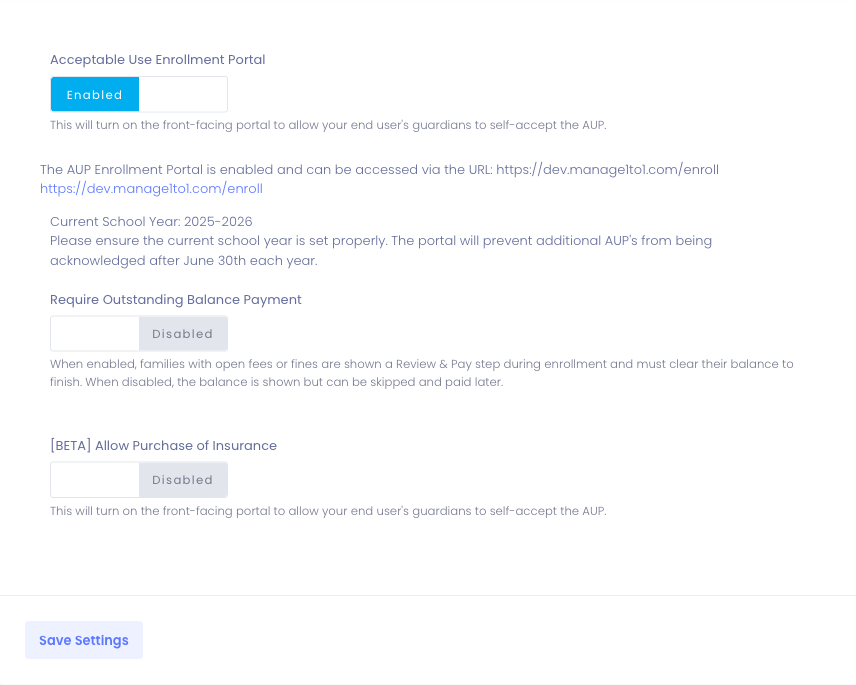
Require Outstanding Balance Payment
When a family acknowledges the AUP during enrollment and the student has open fees or fines, a Review & Pay step is shown so families can take care of the balance while they are already in the enrollment flow. This setting controls whether that step can be skipped.
Options:
- Enabled - Families with an open balance must pay in full to finish enrollment. The Review & Pay step cannot be skipped.
- Disabled (default) - The balance is still shown during enrollment, but families can choose Skip For Now and pay later from the Family Portal.
When to enable:
- Your district requires fees and fines to be settled before a device is issued
- You want enrollment and payment collected together in a single sitting
When to leave disabled:
- You want families to acknowledge the AUP without payment being a barrier to completing enrollment
- Balances are commonly resolved separately (financial aid, fee waivers, payment plans)
Note: This setting only affects whether the Review & Pay step can be skipped. The AUP acknowledgement itself is always recorded as soon as the family submits it, regardless of any outstanding balance.
Acceptable Use Policies List
Viewing AUPs
The Acceptable Use Policies table shows:
| School Year | Last Modified | Status | Actions |
|---|---|---|---|
| 2024-2025 | 08/01/2024 | Active | [Edit] |
| 2023-2024 | 08/15/2023 | Locked | [View] |
What you'll see:
- School Year - Which academic year the AUP applies to
- Last Modified - When the AUP text was last updated
- Status - Active (editable) or Locked (has acknowledgements)
- Actions - Edit button (if no acknowledgements) or View only (if locked)
AUP Status
Active (Editable):
- No acknowledgements recorded yet
- Can be edited or modified
- Typically set up before school year starts
Locked (Immutable):
- At least one user has acknowledged the AUP
- Cannot be edited through the interface
- Preserved for legal/liability reasons
If your district records AUP acceptance elsewhere, you can send those acknowledgments in automatically instead of collecting them again in the portal. Turn on Automatic AUP Import in Automation Settings and drop an aup.csv file (Local ID + AUP Acknowledged) into your SFTP folder. It only adds acknowledgments, so it never overrides one a user made in the portal.
AUP Immutability
Once an Acceptable Use Policy has been accepted by at least one user for a school year, it becomes locked and cannot be modified through the interface.
Why AUPs are locked after acknowledgement:
- Legal integrity - Prevents changing policy after users agreed to original version
- Liability protection - Ensures acknowledged policy matches what users signed
- Compliance - Maintains accurate record of what was agreed to
What if I need to change a locked AUP? Submit a Support Ticket to Manage1to1 Support. They can assist with:
- Creating a revised policy version
- Communicating changes to families who already signed
- Re-collecting acknowledgements if needed
- Handling special circumstances
Best practice: Finalize and review AUP content thoroughly BEFORE enabling the enrollment portal or collecting acknowledgements. Once signatures start coming in, edits require support intervention.
AUP Workflows
Setting Up AUP for New School Year
Before school starts (July/August):
- Navigate to
Settings > Parent & AUP Portals > AUP Managementtab - Check if AUP for upcoming school year exists
- If not, create new AUP (or copy from previous year)
- Edit AUP text to match current year and policies (see Modify AUP)
- Review AUP content carefully
- Save AUP (while still unlocked/editable)
- Enable AUP Enrollment Portal setting
- Copy enrollment URL for distribution to families
- Communicate enrollment URL to parents/guardians
Parent acknowledgement process:
- Parent receives email or letter with enrollment URL
- Parent visits
https://your-district.manage1to1.com/enroll - Parent enters student ID or email to identify their child
- Parent reads AUP text
- Parent checks "I agree" and submits
- Acknowledgement is recorded in system
- If the student has open fees or fines, the parent is shown a Review & Pay step (see below)
- Parent receives confirmation
- AUP signature appears on student's user profile
Review & Pay During Enrollment
If a student has outstanding fees or fines when their AUP is acknowledged, the family is shown a Review & Pay step listing each open charge, its itemized lines, and the total family balance. Families can pay any charge immediately or, depending on the Require Outstanding Balance Payment setting, continue and pay later.
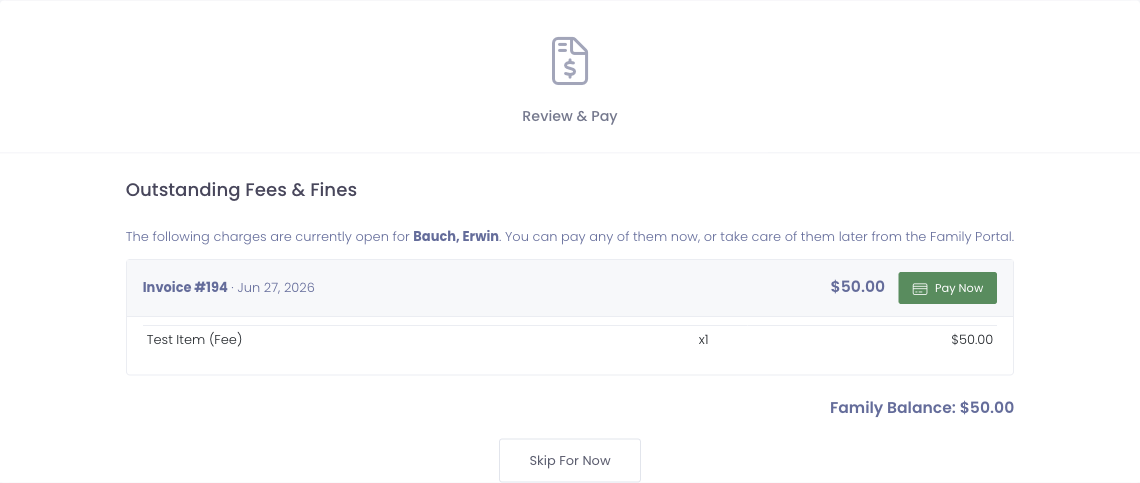
- Pay Now opens the secure payment page for that invoice.
- Skip For Now continues enrollment and is available only when the Require Outstanding Balance Payment setting is disabled.
If a student has no open balance, this step is skipped automatically and the family goes straight to confirmation.
Administrator view:
- View AUP status on user's User Information tab
- See who acknowledged, when, and from what IP address
- Run reports on AUP acknowledgement rates
Mid-Year Enrollment
New student arrives in October:
- Create user account for new student
- Add guardian email address to user profile
- Email parent with AUP enrollment URL
- Parent acknowledges AUP via enrollment portal
- Signature recorded on user profile
- Student can receive device checkout
Note: If AUP enrollment portal is disabled, you'll need to re-enable it or collect signature through alternate method (paper form, in-person at office, etc.).
Enrollment URL
Format:
https://your-district.manage1to1.com/enroll
Sharing the URL:
- Email to all families at beginning of school year
- Include in new student welcome packets
- Post on district website
- Include in back-to-school communications
- Share during parent orientation
URL behavior:
- If AUP enrollment is enabled: Shows AUP acknowledgement form
- If AUP enrollment is disabled: Shows "Enrollment not available" message
- Works on all devices (desktop, tablet, mobile)
Tips for AUP Management
✅ Do:
- Review and finalize AUP content before enabling enrollment
- Create new AUP each school year (policies may change)
- Test enrollment process with a sample account before announcing to families
- Communicate enrollment deadline to parents
- Monitor acknowledgement rates and follow up with non-responders
- Keep previous years' AUPs for historical reference
❌ Don't:
- Enable enrollment portal before AUP content is finalized
- Modify AUP after acknowledgements have started (requires support ticket)
- Delete old AUPs (keep for historical/audit purposes)
- Assume all parents will acknowledge immediately (plan for follow-up)
- Forget to update AUP for new school year
Common Questions
Q: Can I use the same AUP text every year? You can, but it's recommended to review and update annually. District policies may change, new technology may be introduced, or legal requirements may evolve. At minimum, update the school year dates.
Q: What happens if I try to edit an AUP after someone has signed it? The system will prevent you from editing. You'll see a "locked" or "immutable" message. Contact Manage1to1 Support if changes are absolutely necessary.
Q: How do I know who has acknowledged the AUP?
- View individual user profiles (User Information tab shows AUP status)
- Run reports from Reports section (AUP acknowledgement reports)
- Check acknowledgement date and IP address on user profile
Q: Can parents acknowledge the AUP from the Parent Portal instead of /enroll?
Yes. If the Parent Portal is enabled, parents can acknowledge the AUP from within the portal after logging in. The /enroll URL provides a standalone option that doesn't require full portal access.
Q: What if a parent doesn't have internet access to acknowledge online? Provide a paper AUP form as an alternative. The office can manually mark the AUP as acknowledged on the student's user profile after receiving the signed paper form.
Q: How do I manually mark an AUP as acknowledged? From the user's profile, navigate to the User Information tab. There should be an option to manually record AUP acknowledgement (requires appropriate permissions). This is typically used for paper forms or special circumstances.
Q: Can I have different AUPs for students vs. staff? AUP management is typically configured for all users (students and staff use the same AUP). If your district needs separate policies, contact Manage1to1 Support about configuration options.
Q: What if the enrollment URL isn't working? Check that the AUP Enrollment Portal setting is enabled. If enabled and still not working, contact Manage1to1 Support for assistance.
Q: Do I need a new AUP every school year? Best practice is yes. Even if the policy text doesn't change, create a new AUP for each school year to ensure acknowledgements are tracked per year and to allow for annual policy reviews.
Q: Can I see the AUP text that a parent acknowledged? Yes. The system preserves the exact AUP text that was active when acknowledgement occurred. This ensures you have an accurate record of what was agreed to, even if you later modify the current year's AUP.
AUP Management provides centralized control over digital policy acknowledgements. Properly configured AUPs streamline policy distribution, provide legal documentation of user agreements, and replace cumbersome paper forms with efficient digital workflows.