General Tab
The General Tab controls system-wide Help Desk behavior, including portal availability, ticket lifecycle automation, security settings, and user interaction preferences.
These settings affect all Help Desk Departments and apply to both portal-submitted and email-imported tickets.
To modify General Help Desk settings, you need the Manage Settings permission assigned to your role.
Overview
General Help Desk settings control the help desk experience and how ticket activity behaves across the system.
What you'll configure:
- Portal availability and login requirements
- Ticket closure and reopening rules
- Attachment security restrictions
- Reply timestamp behavior
- Carbon copy handling
- Automatic ticket closure timing
Why these settings matter:
- Security - Login requirements and attachment restrictions prevent abuse
- Automation - Auto-close reduces manual ticket management overhead
- User experience - Portal settings determine how users interact with support
- Workflow efficiency - Reply timestamp and closure settings keep ticket queues manageable
Settings Reference
Enable Help Desk Portal
Enables the client-facing portal where end users can submit and reply to tickets through the web interface.
Require Login
When enabled, end users must authenticate before submitting or replying through the portal. This is strongly recommended to prevent anonymous or malicious ticket submissions.
Leaving login requirements disabled can allow unsolicited ticket creation depending on your portal configuration.
Auto Add Carbon Copy Recipients
When enabled, incoming email tickets that include carbon copy recipients will keep those recipients copied on replies.
Prevent Reopening Closed Tickets
When enabled, tickets cannot be reopened once they are closed. This helps enforce closure discipline and prevents old issues from resurfacing without review.
Allow Submitting Tickets on Behalf of Others
Lets staff file a support ticket for another user (staff or student) from the User Portal. The submitter stays the ticket owner, but the ticket is clearly marked as being on behalf of the other person. When enabled, submitters confirm who the ticket is for by entering that person's exact email address or ID, and can optionally attach a device by typing its asset tag or serial number. Off by default.
Allow Students to Submit on Behalf of Others
Extends on-behalf submission to student portal users. This has no effect unless Allow Submitting Tickets on Behalf of Others is also enabled. Off by default. Most districts leave on-behalf submission to staff only.
Last Reply Timestamp
Controls when the “Last Reply” timestamp updates.
If set to update on every reply, any user reply refreshes the timestamp.
If set to update on staff replies only (and on client status change), the timestamp better reflects staff activity rather than routine end user follow-ups.
Ticket Reply List Order
Controls the message display order inside a ticket when viewing the ticket thread.
Enforce Allowed File Types
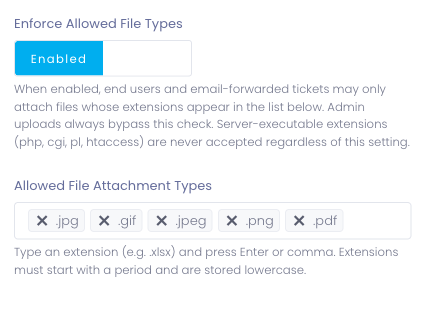
When enabled (the default), end-user attachments — from the client portal and from tickets opened or replied to via email — must use one of the extensions in the Allowed File Attachment Types list below. When disabled, the list is ignored and any extension (other than the always-blocked server-executable ones) is accepted.
Server-executable extensions (php, cgi, pl, htaccess) are never accepted regardless of this setting.
Admin users — when opening a ticket, posting a reply, or attaching a file to an internal note — always bypass this check.
Most districts should leave enforcement on. Disable only if you actively need to accept arbitrary file types from end users and you trust your user base — for example, a small internal IT desk where staff routinely attach unusual file formats and the whitelist becomes friction.
Allowed File Attachment Types
The list of extensions end-user uploads are accepted under when Enforce Allowed File Types is on. Type a new extension (for example .xlsx) into the picker and press Enter or comma to add it. Extensions must start with a period and are stored in lowercase.
Do not add executable or script-based file types. Attachments are user-supplied content and should be treated as untrusted.
This list is hidden while Enforce Allowed File Types is disabled because it has no effect in that mode.
Automatically Close Inactive Tickets
When set to a number greater than 0, tickets are automatically closed after the specified number of hours if they meet the inactivity requirements.
Automatic closing only applies when all criteria are met:
- The ticket status is Answered or User Replied
- No new replies have been added during the configured time window
- The setting is not disabled
Setting this value to 0 disables automatic closing.
Closure occurs during the daily automation run as configured in System Automation >> Automation Settings Tab. Tickets in On Hold or Open are not automatically closed by this rule.
Automatic close also triggers the customer notification email used for inactivity closure. This message is configurable in Email Templates.
Common Questions
Q: Should I require login for the help desk portal? Yes, strongly recommended. Requiring login prevents anonymous ticket submissions and spam. Users must authenticate before submitting requests, ensuring accountability and reducing abuse risk.
Q: What file types should I allow for attachments?
Allow common safe formats: .jpg, .png, .pdf, .doc, .docx. Never allow executable types (.exe, .bat, .sh, .app) or scripting formats (.js, .php, .html) as these pose security risks.
Q: What happens to tickets when auto-close triggers? Tickets meeting the inactivity criteria (Answered or User Replied status, no recent replies) are automatically closed during the daily automation run. Users receive a closure notification email if configured in Email Templates.
Q: Can users reopen closed tickets? Depends on the Prevent Reopening Closed Tickets setting. If enabled, closed tickets cannot be reopened. If disabled, users can reply to closed tickets and reopen them. Most districts enable this to enforce closure discipline.
Q: What's the difference between the two Last Reply Timestamp options?
- Update on every reply: Timestamp refreshes whenever anyone replies (user or staff)
- Update on staff replies only: Timestamp only updates when staff reply or ticket status changes, better reflecting actual staff activity
Q: Does auto-close work if email importing is enabled? Yes. Auto-close applies to all tickets regardless of submission method (portal or email). Tickets meeting inactivity criteria are closed automatically during daily automation.
Q: Will carbon copy recipients see all ticket replies? Only if Auto Add Carbon Copy Recipients is enabled. When enabled, anyone CC'd on the original email remains copied on all replies. If disabled, only the primary sender receives updates.
Q: How often does auto-close run? Auto-close runs during the daily automation window configured in System Automation >> Automation Settings Tab. Typically once per day at the scheduled time.