Checkout History Tab
The Checkout History tab provides a complete chronological record of every device and cart that has been assigned to a user over time. Think of it as the complete assignment timeline - showing what they have now, what they had before, when devices were issued, and when they were returned.
This tab is essential for audits, accountability, troubleshooting device issues, and answering questions about device assignment patterns.
To view the Checkout History tab, you need the View Users permission assigned to your role.
Understanding Checkout History
Think of checkout history as a logbook of everything this user has ever been assigned - a permanent record that helps answer questions like "Who had this device last semester?" or "How many times has this student needed a replacement device?"
What checkout history shows:
- Every device checkout (current and historical)
- Cart checkouts (classroom sets, loaner carts)
- Checkout dates (when assigned)
- Check-in dates (when returned)
- Loaner status (temporary vs. permanent assignments)
- Active vs. returned status
- Complete audit trail
What checkout history doesn't show:
- Who checked the device out to the user (see device Activity Log)
- Why the device was checked in (see device Notes or Incidents)
- Device condition at check-in (see Incident History tab)
Why checkout history is important:
- Accountability - Prove who had what device when
- Auditing - Verify asset assignment records
- Troubleshooting - Identify device assignment patterns
- Parent questions - Answer "When did my child get this device?"
- Investigation - Research device history for incident reviews
- Compliance - Maintain complete records for district policies
What You'll See on the Tab
The Checkout History tab displays a table showing all checkout events for this user:
Checkout History Table Columns
| Column | What It Shows |
|---|---|
| Status | Active (currently checked out) or Returned (checked in) |
| Item Type | Device (individual device) or Cart (group checkout) |
| Device/Cart | Device type and identifier (e.g., "Chromebook - Serial ABC123") or cart name |
| Checkout Date | When the item was checked out to the user |
| Check-in Date | When the item was returned (blank if still checked out) |
| Is Loaner | Whether this was a temporary loaner assignment |
| Actions | View, Print Receipt (for devices), Expand Details |
Visual indicators:
- Active checkouts - Highlighted or marked to stand out from historical records
- Returned checkouts - Standard formatting, includes check-in date
- Loaner checkouts - Badge or icon indicating temporary assignment
Example entry:
Status: Active
Item Type: Device
Device: Chromebook - Serial #123ABC456
Checkout Date: 08/15/2024
Check-in Date: (blank - still checked out)
Is Loaner: No
Actions: [View] [Print Receipt] [Expand ▼]
Example historical entry:
Status: Returned
Item Type: Device
Device: iPad - Serial #789XYZ012
Checkout Date: 01/12/2024
Check-in Date: 06/01/2024
Is Loaner: Yes (replacement during repair)
Actions: [View] [Print Receipt] [Expand ▼]
Viewing Checkout Details (Audit Popover)
Each row's Actions column has a small info button. Click it to reveal additional metadata about the checkout without leaving the page.
What the Popover Shows
- Checked out — exact date and time of checkout
- By — administrator who performed the checkout
- Returned — exact date and time of return (or "Still checked out")
- Returned by — administrator who processed the return
- Record ID — internal system identifier for this checkout transaction
When to use the popover:
- Need precise checkout/check-in timestamps for investigations
- Verifying which administrator processed the transaction
- Researching timeline details during incident reviews
Captured Signature Badge
When a Signature Policy applied to this checkout, the row's Actions column also shows a small signature icon. Click it to view the captured e-signature image alongside the signer's role, typed name, timestamp, and IP address.
Active vs. Returned Checkouts
The Checkout History tab shows both current and historical checkouts:
Active Checkouts
Characteristics:
- Status: Active
- Check-in Date: Blank (not yet returned)
- Appears at the top of the list
- Visually highlighted or distinguished
What this means:
- User currently has this device/cart
- Device is in the user's possession right now
- No check-in recorded yet
Actions available:
- View full checkout details
- Print checkout receipt
- Navigate to device profile to check in
Returned Checkouts
Characteristics:
- Status: Returned
- Check-in Date: Populated with return date
- Appears in chronological order below active checkouts
What this means:
- User previously had this device/cart but returned it
- Historical record preserved for audit trail
- Complete checkout cycle recorded
Actions available:
- View full checkout details
- Print historical receipt
- Review exact checkout duration
Common Use Cases
Scenario 1: Parent Questions Device Assignment Date
A parent calls asking when their child received their current Chromebook:
- Open the student's user profile
- Click Checkout History tab
- Look at Active Checkouts section (top of list)
- Find current Chromebook entry
- Check Checkout Date column: 08/15/2024
- Tell parent: "The Chromebook was checked out on August 15, 2024"
Result: Quick, accurate answer to parent's question.
Scenario 2: Auditing Device Assignment Records
District IT needs to verify all device assignments for the school year:
- Export checkout history for all users (from reports)
- Or manually review key users' profiles
- Open user profile
- Click Checkout History tab
- Review all Active checkouts
- Verify each has valid checkout date
- Confirm devices match expected assignments
- Check for any unreturned loaners that should have been returned
Result: Complete audit trail of device assignments verified.
Scenario 3: Investigating Lost Device Claim
A student claims their device was lost 3 weeks ago, but there's no incident report:
- Open student's user profile
- Click Checkout History tab
- Review Active Checkouts:
- Chromebook checked out 6 months ago (still active, not checked in)
- Check Incident History tab:
- No loss incident reported
- Expand the checkout row to see:
- Checkout date: 08/15/2024
- No check-in date (still shown as checked out)
- No loss incident linked
- Create incident for lost device
- Process check-in and loss documentation
Result: Identified discrepancy between claim and records, corrected documentation.
Scenario 4: Understanding Device Turnover Pattern
A student has requested yet another replacement device, and staff want to understand why:
- Open student's user profile
- Click Checkout History tab
- Review all checkouts for the school year:
- Checkout 1: Chromebook #1, 08/15/2024 - 09/10/2024 (returned, 26 days)
- Checkout 2: Chromebook #2 (loaner), 09/10/2024 - 09/20/2024 (returned, 10 days)
- Checkout 3: Chromebook #3, 09/20/2024 - 11/05/2024 (returned, 46 days)
- Checkout 4: Chromebook #4, 11/05/2024 - Present (active, 60 days so far)
- Cross-reference with Incident History tab:
- Incident #1: Broken screen (09/10)
- Incident #2: Water damage (11/05)
- Identify pattern: Student has had 4 devices in 3 months, all due to damage
- Decision: Require additional device training before issuing next device
Result: Pattern identified, intervention planned.
Scenario 5: Verifying Summer Device Collection
End of school year - verifying all students returned devices for summer:
- Filter students by grade level (e.g., all 8th graders)
- For each student:
- Open user profile
- Click Checkout History tab
- Check for Active Checkouts
- If active checkouts found:
- Note the device and student
- Contact family for device return
- If no active checkouts:
- Student clear for summer
- Document students with unreturned devices
Result: Complete verification of summer device collection.
Checkout Actions
View Checkout
Click View to open the full checkout record.
What you'll see:
- Complete checkout transaction details
- Device/cart information
- Timestamps and administrator information
- Associated notes or special conditions
- Links to device/cart profile
When to use:
- Need complete checkout transaction details
- Reviewing checkout for audit purposes
- Verifying exact checkout conditions
Print Receipt
Click Print Receipt to generate a PDF receipt of the checkout.
What's included:
- User information
- Device information (serial, asset tag)
- Checkout date and time
- Administrator who performed checkout
- Acknowledgment of receipt (for signatures if needed)
When to use:
- Creating paper records for device assignment
- Providing user with checkout confirmation
- Building-level record keeping
- Insurance documentation
Formats:
- PDF download for printing
- Email option (if configured)
Print Receipt is typically available for device checkouts. Cart checkout receipts may vary depending on district configuration.
Understanding Loaner Assignments
The Is Loaner column indicates whether a checkout was a temporary loaner device.
What "Loaner" Means
Loaner checkouts:
- Temporary device issued while user's assigned device is being repaired
- Interim device during replacement processing
- Short-term assignment for specific purposes
Non-loaner checkouts:
- Permanent assignment for the school year
- User's primary device
Why this matters:
- Loaners should be returned when primary device is ready
- Loaners in checkout history help explain multiple device assignments
- Unreturned loaners may indicate missing devices
Example pattern:
08/15/2024 - 10/01/2024: Chromebook #123 (primary) - Returned due to damage
10/01/2024 - 10/15/2024: Chromebook #456 (LOANER) - Returned after repair complete
10/15/2024 - Present: Chromebook #123 (primary) - Active (repaired, reassigned)
This pattern shows: device was damaged, loaner issued during repair, original device returned after repair.
Cart Checkouts vs. Device Checkouts
The Checkout History tab shows both individual device checkouts and cart checkouts:
Device Checkouts
What they are:
- Individual devices assigned to a user
- One device per checkout record
- Most common type
Displayed as:
- Item Type: Device
- Device: "Chromebook - Serial ABC123"
Cart Checkouts
What they are:
- Entire carts (sets of devices) assigned to a user (typically teachers)
- One cart may contain 10, 20, or 30 devices
- Less common, usually for classroom sets
Displayed as:
- Item Type: Cart
- Cart: "Cart Name - Grade 5 Science Cart"
Differences:
- Cart checkouts represent multiple devices under one assignment
- Returning a cart returns all devices in the cart
- Cart checkouts are typically to staff for classroom use
Tips for Using Checkout History
✅ Do:
- Review checkout history before making device assignment decisions
- Check for patterns (frequent replacements, short checkout durations)
- Use expanded view for precise timestamp details
- Cross-reference with Incident History tab for complete context
- Export checkout history for audit documentation
- Verify active checkouts before year-end device collection
- Use Print Receipt for record keeping
❌ Don't:
- Assume no active checkouts without checking visually
- Ignore patterns of frequent device turnover (may indicate training needs)
- Forget to check loaner status (unreturned loaners are missing devices)
- Edit checkout records directly (all changes should be through proper check-in workflows)
- Delete historical checkouts (permanent audit trail)
- Skip checking cart checkouts for staff users (may have classroom sets checked out)
Common Questions
Q: What's the difference between "Current Checkouts" on the User Information tab and this Checkout History tab?
- Current Checkouts (User Information tab) - Only shows ACTIVE (currently checked out) items
- Checkout History tab - Shows ALL checkouts, both active and historical (returned)
The User Information tab is for "what they have now," and Checkout History is for "everything they've ever had."
Q: Can I edit checkout dates or check-in dates from this tab? No. Checkout History is a read-only audit trail. All check-ins and checkouts must be performed through the proper workflows (device checkout, device check-in) to maintain data integrity.
Q: Why does a student have so many checkout records? Multiple reasons:
- Device replacements due to damage, loss, or upgrades
- Loaner devices issued during repairs
- Different devices for different school years
- Upgrades (e.g., switching from iPad to Chromebook)
Review the Is Loaner column and cross-reference with Incident History tab to understand why.
Q: How far back does checkout history go? Checkout history is maintained indefinitely unless your district has a data retention policy that archives old records. Typically, you can see all checkouts for the user's entire time in the district.
Q: What if a checkout shows as "Active" but the device was actually returned? This indicates the device was never checked in properly. You should:
- Verify if the device is truly returned
- Process a proper check-in through the device profile or checkout system
- Once checked in, the status will update to "Returned" with a check-in date
Q: Can I see who checked the device in or out? Yes! Expand the checkout row to see:
- Checked Out By - Administrator who performed the checkout
- Checked In By - Administrator who performed the check-in
This is useful for accountability and investigating checkout/check-in timing.
Q: Why would a student have both a device checkout AND a cart checkout? Uncommon but possible. Typically:
- Students - Have individual device checkouts
- Staff - May have individual device checkout (personal laptop) AND cart checkout (classroom set)
If a student has a cart checkout, verify this is intentional (may be a student aide managing a cart).
Q: What does "Print Receipt" do? Generates a PDF containing:
- User and device information
- Checkout date and details
- Administrator who performed checkout
- Can be used for signatures or record-keeping
Useful for creating paper trails or acknowledgment forms.
Q: Can I export the checkout history for this user? Export options depend on your system configuration. Typically:
- Export entire checkout history table to CSV
- Use Print Receipt for individual checkouts
- Use district-wide reports for bulk checkout history across all users
Q: Why doesn't a returned checkout have a check-in date? This shouldn't happen in a properly functioning system. If a checkout shows "Returned" status but no check-in date, this may be a data issue. Contact your system administrator.
Q: Can I delete old checkout records? No. Checkout history is a permanent audit trail. Old records should be preserved for:
- Accountability
- Compliance
- Auditing
- Historical reference
Only system administrators with database access can remove checkout records, and this is strongly discouraged.
Q: What if I need to see checkout history for a device, not a user? Go to the device profile and view its Checkout History tab. That shows all users who have had that specific device over time. This tab shows all devices a specific user has had.
The Checkout History tab provides a complete, chronological audit trail of every device and cart assignment for a user. This permanent record supports accountability, auditing, troubleshooting, and answering questions about device assignment patterns over time.
Room Responsibility History (Staff Only)
For staff users, a second portlet appears below the device checkout table: Room Responsibility History. This is the timeline of every room this person has been the responsible teacher / staff member for, including periods that have ended.
Manage1to1 tracks room responsibility over time. When you add or remove a teacher from a room (on the room's edit page), the previous responsibility period is closed with an end date and a new one opens — so historical attribution is preserved. This portlet is how you read that history from the person's side.
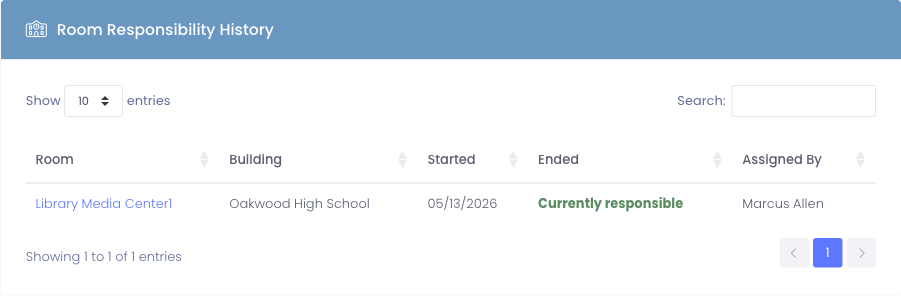
What you'll see
| Column | What it shows |
|---|---|
| Room | The room name, linking to that room's detail page |
| Building | The building the room is in (helpful when room names repeat across schools) |
| Started | The day this person became responsible for the room |
| Ended | The day responsibility ended, or Currently responsible if it's still active |
| Assigned By | The administrator who recorded the assignment |
Rows are sorted newest-first by Started date, paginated 10 at a time. Active periods (no end date yet) are highlighted with Currently responsible in green so you can spot them at a glance.
Why it exists
This portlet answers the kind of point-in-time question that's normally a pain to research:
- "Who was the teacher of Room 205 on March 14, 2024?" — Open the room profile and check its Staff Responsibility History; or open the teacher you suspect and find the row where Started ≤ 03/14/2024 and Ended is blank or ≥ 03/14/2024.
- "How long has Mrs. Johnson been responsible for the STEM Lab?" — Open her profile, find the STEM Lab row in this portlet, read the Started date.
- "Which rooms has Mr. Patel managed during his time at the district?" — Every row on his profile is a period; the full list is right here.
For students (or staff who have never been assigned to a room), this portlet doesn't appear at all.
Where the data comes from
Responsibility assignments are managed on the room's edit page, where you set which teachers are responsible. Adding a teacher there starts a new responsibility period. Removing one closes the existing period. The portlet here is read-only — it reflects whatever has been recorded on the room side.
To add or change responsibility, edit the room itself rather than the user.