Bulk Device Checkout and Process
Bulk Device Checkout and Process lets you check out devices to users in batch using a CSV file — upload the file, review a preview of exactly what will happen, then confirm.
This workflow is commonly used during mass distribution events such as beginning of school year device distribution or large-scale device refreshes.
Uploading and clicking Preview & Process Bulk Checkout only shows you what will happen — how many devices will be checked out, how many users will receive them, and any rows that will be skipped. No devices are checked out until you click Confirm & Check Out on the preview screen.
To access System Utilities, you need the Manage Settings permission assigned to your role.
Understanding Bulk Device Checkout
Think of bulk device checkout as mass device distribution automation - you prepare a list of device-to-user assignments, upload it, and process it to check out hundreds or thousands of devices at once.
What this utility does:
- Uploads a bulk checkout CSV into a staging area
- Processes the CSV and performs checkouts according to the file
- Creates checkout records and updates device status
- Provides a delete option if the wrong file is uploaded
When to use:
- Beginning of school year device distribution
- Grade-level or building-wide device refresh
- New device shipment distribution
- Replacing old devices with new ones in batch
When NOT to use:
- Checking out single devices (use manual checkout)
- Small batches (<10 devices) where manual checkout is faster
The Workflow
Step 1: Upload the Bulk Checkout CSV
Upload prepares the file for processing but does not check out devices yet.
How to upload:
- Navigate to Settings → System Utilities → Devices tab
- Locate Bulk Device Checkout
- Download the CSV Import Template
- Populate the template with checkout records (device serial + user ID)
- Upload the CSV using the upload area
What happens:
- File is validated for format
- CSV is staged in system for processing
- No devices are checked out yet
Step 2: Preview the Checkout
Clicking Preview & Process Bulk Checkout reads the staged file and shows you a summary — it does not check out anything yet.
How to preview:
- Locate Bulk Checkout Process
- Confirm the correct file is present (review timestamp)
- Click Preview & Process Bulk Checkout
- Review the preview screen (covered in Reviewing the Preview below)
Step 3: Confirm the Checkout
When the preview looks right, click Confirm & Check Out to apply the checkouts.
What happens:
- Devices are checked out to the specified users
- Checkout history records created
- Device status updated to "Checked Out"
- Inventory counts updated
- Rows flagged as skipped are left untouched
If anything looks wrong, click Cancel instead — nothing is written and you can fix and re-upload the CSV.
Reviewing the Preview
The preview screen opens after you click Preview & Process Bulk Checkout and summarizes exactly what confirming will do.
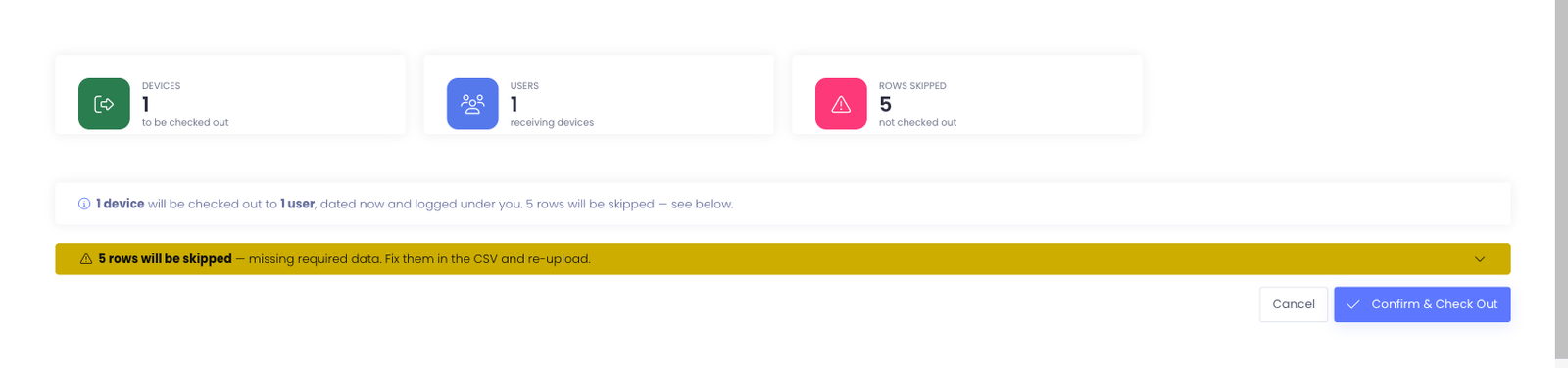
Summary cards
The cards across the top give you the totals at a glance:
- Devices — devices that will be checked out
- Users — users who will receive a device
- Rows Skipped — rows missing required data; these are left out and no device is checked out for them
Skipped rows
Rows missing required data are grouped into a collapsible rows will be skipped notice. Expand it to see which rows were left out, fix them in your CSV, and re-upload if you want them included.
CSV Template and Requirements
Download the Template
Use the CSV Import Template button to download the expected checkout format.
Common columns:
- Device Serial Number (required)
- User ID (required)
- Checkout Date (optional - defaults to today)
Column requirements:
- Device serial numbers must match existing devices in Manage1to1
- User IDs must match existing users
- Devices must be available for checkout (not already checked out)
Before You Upload
Checklist:
- ✓ Verify device serial numbers match inventory
- ✓ Verify user IDs match existing students/staff
- ✓ Confirm devices are not already checked out
- ✓ Remove test rows or header comments
- ✓ Ensure file is saved as CSV (not Excel .xlsx)
Common mistakes to avoid:
- Device serial numbers that don't exist
- User IDs that don't exist
- Devices already checked out to someone else
- Duplicate rows (same device listed twice)
Delete Option
If the uploaded file is incorrect, delete it and re-upload.
How to delete:
- Locate Bulk Checkout Process
- Click Delete Checkout CSV File
- File is removed from staging
- Re-upload the corrected file using Bulk Device Checkout
When to delete:
- Wrong file uploaded
- Errors found in CSV after uploading
- Need to make changes before processing
Important: Delete must be done BEFORE processing. Once processed, checkouts are applied and cannot be undone by deleting the CSV.
Verification Steps
After processing, confirm checkouts were applied correctly.
What to check:
- Devices show as checked out to the intended users
- Checkout history is present where expected
- Inventory reports reflect expected checked-out counts
- Device status changed to "Checked Out"
- Users can see their assigned devices
Recommended verification:
- Run device checkout report
- Check 10-15 device records manually
- Verify user assignments are correct
- Confirm checkout dates are accurate
- Check inventory totals match expectations
If problems found:
- Review CSV for serial number or user ID errors
- Check that devices existed and were available
- Verify users existed in system
- Contact Manage1to1 Support if checkout results are unexpected
Best Practices
✅ Do:
- Download template from your environment
- Test with small CSV (5-10 devices) before processing full file
- Verify all device serial numbers exist in inventory
- Confirm all user IDs exist before upload
- Coordinate distribution timing with upload/processing
❌ Don't:
- Click Confirm & Check Out without reading the preview summary first
- Include devices already checked out
- Use serial numbers that don't exist
- Upload CSV with thousands of rows without testing
- Process same file multiple times (creates duplicate checkout attempts)
Common Questions
Q: Can I cancel after clicking Preview & Process Bulk Checkout? Yes. The preview writes nothing. Click Cancel to walk away with no changes, or Confirm & Check Out to apply what the preview shows.
Q: What happens if a device in the CSV is already checked out? That device checkout will fail and be skipped. Other devices in the CSV will still process. Review results to identify failed checkouts.
Q: Can I upload multiple CSV files before processing? No. Only one CSV can be staged at a time. Process or delete the current file before uploading another.
Q: How long does processing take? Depends on file size. Small files (50 devices): seconds. Large files (2000+ devices): several minutes.
Q: What if a user ID in the CSV doesn't exist? That checkout will fail. The device remains available. Correct the user ID and re-upload the CSV.
Q: Can I specify checkout date in the CSV? Check your template - some configurations allow checkout date column. If not provided, defaults to current date.
Q: Will users be notified when devices are checked out via bulk process? This depends on notification settings. Check with your administrator or Manage1to1 Support about automated checkout notifications.
Q: What if I process the same CSV twice? Devices already checked out will fail on second processing. Only devices still available will be checked out again (potentially creating duplicate checkout attempts).
Bulk Device Checkout and Process enables efficient mass device distribution for large-scale deployment events, eliminating manual one-by-one checkouts and reducing distribution time significantly.